
Route One WordPress Form to Multiple CRMs at Once
Fan a single WordPress form submission out to HubSpot, Salesforce, Pipedrive, Zoho, Mailchimp, and ActiveCampaign simultaneously - alongside Google Sheets, with conditional routing, and no per-task fees.
In This Guide
- What Does It Mean to Fan Out One Form to Multiple CRMs?
- Why Does Speed-to-Lead Make Fan-Out Worth It?
- How Much Does Zapier Cost to Send One Lead to Six CRMs?
- How Do You Set Up Multi-CRM Routing in SheetLink?
- Can You Route Leads to Different CRMs by Field Value?
- Why Keep Google Sheets in the Fan-Out?
- What Happens If One CRM Is Down During Fan-Out?
- Does Fan-Out Preserve Marketing Attribution Across CRMs?
- How Does SheetLink Fan-Out Compare to Zapier and Single-CRM Plugins?
- Is Multi-CRM Fan-Out Worth It for Agencies?
- Frequently Asked Questions
What Does It Mean to Fan Out One Form to Multiple CRMs?
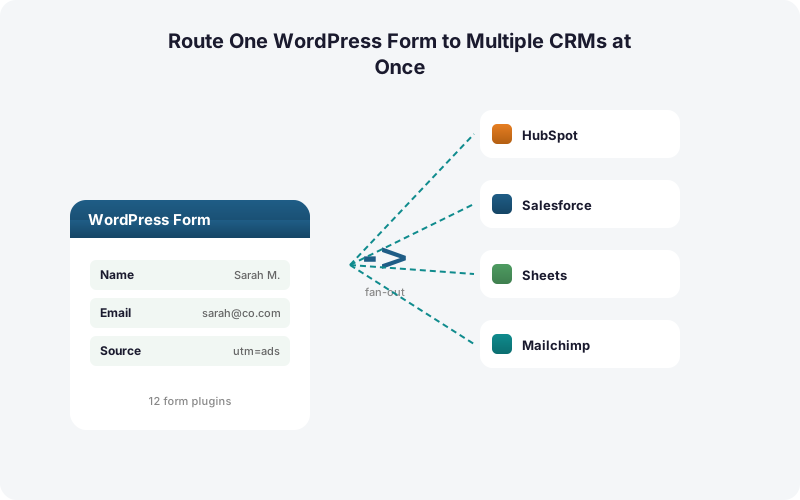
Fan-out means a single WordPress form submission is delivered to several destinations at the same instant: HubSpot for sales, Mailchimp for nurture, a Google Sheet for the ops team. SheetLink's Multi-CRM Routing add-on ($49/mo) sends each lead to HubSpot, Salesforce, Pipedrive, Zoho, Mailchimp, and ActiveCampaign at once.
The CRM market reached roughly $73.4B in 2024 and is projected to hit $163.16B by 2030 (Grand View Research, 2024). Most teams now run several systems side by side, so one lead rarely belongs in just one place.
Why does this matter? Because routing a lead manually, or rebuilding the same connection six times, wastes the minutes that decide whether you reach that lead at all.
Why Does Speed-to-Lead Make Fan-Out Worth It?
Speed is the whole point. Contacting a web lead within 5 minutes instead of 30 makes you about 100x likelier to connect and roughly 21x likelier to qualify the lead (HBR, 2011). A nightly CRM sync misses that window entirely.
Most companies are slow anyway. In a study of 114 B2B firms, the average email response was about 11 hours 54 minutes and the average phone response about 14 hours 29 minutes, with essentially none replying inside 5 minutes (Workato, 2019-2020).
Instant fan-out flips that. The submission lands in every CRM in real time, so whichever rep or sequence owns that lead can act while intent is still hot. We've found the speed gain matters more than the tool choice itself.
How Much Does Zapier Cost to Send One Lead to Six CRMs?
Zapier meters by task: one task equals one action. Fanning a single submission to six CRMs in a multi-step Zap burns one task per action, so six destinations costs 6+ tasks per lead (Zapier, 2026). The free tier is 2-step only, capped at 100 tasks per month; multi-step Zaps need a paid plan.
Do the arithmetic. At 500 leads a month across six CRMs, that's 3,000 tasks just for one form, before any other automation. Zapier's Professional plan starts at $19.99/month (annual) for 750 tasks, and overages bill at 1.25x.
This is the trap our research file calls out: competitors treat lead routing as one site to one CRM via Zapier, then quietly charge per action when you scale. SheetLink charges no per-task fees - the $49/mo add-on covers unlimited fan-out volume. See the full breakdown in our Zapier cost guide.
How Do You Set Up Multi-CRM Routing in SheetLink?
Setup is one rule, several checkboxes. After activating the Multi-CRM Routing add-on, you open a sync rule, pick the form, and enable each CRM destination you want the submission to reach. Connect each via OAuth or API key once, map the form fields, and save.
The steps in order:
1. Connect your form. SheetLink supports 12 core form plugins (17 with the Integrations Bundle), including Gravity Forms, WPForms, Fluent Forms, and Elementor Pro.
2. Add destinations. Toggle on HubSpot, Salesforce, Pipedrive, Zoho, Mailchimp, ActiveCampaign, and Google Sheets within the same rule.
3. Map fields per destination. Each CRM gets its own field mapping, so a phone field can land as a HubSpot property and a Pipedrive person field at once.
4. Save and test. Submit a test entry and confirm it appears everywhere. Our Google Sheets setup guide covers the spreadsheet side.
Can You Route Leads to Different CRMs by Field Value?
Yes. Conditional routing sends each submission only to the destinations that match a field value, so an enterprise lead goes to Salesforce while a free-trial signup goes to Mailchimp. This keeps each CRM clean and stops sales reps wading through unqualified entries.
With B2B contact databases decaying about 22.5% per year (HubSpot, citing MarketingSherpa), routing only relevant leads into each system slows the rot. You're not duplicating dead records across six tools.
A common pattern we see: route by a budget dropdown or a country field. "Budget over $10k" fires the Salesforce and HubSpot destinations; everything else goes to Mailchimp plus the catch-all Google Sheet. For a deeper look at the logic, read our conditional routing guide. Conditional rules let one form serve marketing, sales, and ops without three separate forms.
Why Keep Google Sheets in the Fan-Out?
Google Sheets is the free, always-on backup that every CRM fan-out should include. SheetLink delivers to Sheets for free via a Google Apps Script webhook deployed once, so even when a CRM connection hiccups, you keep a complete raw record of every lead.
A Sheet also gives non-CRM teammates instant visibility without a paid CRM seat. Finance, ops, and analysts can filter, pivot, and chart submissions directly. See our Sheets dashboard guide for that.
There's a reliability angle too. Average companies now run around 106 SaaS apps (BetterCloud via Statista, 2024), and any one of them can fail. A Sheet that captures every submission, regardless of which CRM accepted it, is your reconciliation source of truth. Pair it with Google Sheets as a lightweight CRM if you don't have a paid CRM yet.
What Happens If One CRM Is Down During Fan-Out?
SheetLink protects each destination independently with a built-in retry queue. If HubSpot accepts the lead but Pipedrive's API times out, only the failed destination retries - the rest already succeeded. Retries run with exponential backoff at 5 minutes, 30 minutes, and 2 hours.
This matters because the 5-minute speed-to-lead window (HBR, 2011) is unforgiving. A middleware outage that loses the submission entirely costs you the lead. A local queue that retries just delays one destination while the others fire instantly.
Full delivery logs show exactly which destination received which submission and when. So when a rep asks "did that demo request reach Salesforce?", you have an answer. In our experience, that audit trail saves more arguments than any feature.
Does Fan-Out Preserve Marketing Attribution Across CRMs?
Yes, and it should. SheetLink captures UTM parameters and click IDs (GCLID, fbclid, msclkid) automatically, then passes them into every CRM in the fan-out. Capturing the Google Click ID with a lead is how you attribute and import offline conversions back to the campaign (Google Ads Help).
Without this, a lead arrives in HubSpot with no idea which ad created it. Multiply that across six CRMs and your attribution data fragments.
Because SheetLink grabs the click ID at submission time and writes it to each destination identically, every system agrees on the source. That consistency is what makes closed-loop reporting possible. Our attribution guide walks through the field mapping. Why does this beat a Zapier chain? Because each Zap step is a place the click ID can get dropped or remapped.
How Does SheetLink Fan-Out Compare to Zapier and Single-CRM Plugins?
SheetLink wins on cost and simultaneity. Sending one lead to six CRMs costs six Zapier tasks per lead (Zapier, 2026), while SheetLink's flat $49/mo add-on has no per-task fee at any volume. Separate single-CRM plugins force you to install, configure, and maintain six different tools.
The table below lays out the three approaches across the dimensions that actually drive cost: per-task fees, simultaneous destinations, conditional routing, Sheets alongside, and real-time delivery.
Make and Zapier remain useful for genuinely cross-app workflows beyond CRMs. For the specific job of fanning one WordPress form to multiple CRMs, the direct plugin is cheaper and faster. Our true-cost comparison runs the five-year math, and the pricing page shows the add-on tiers.
Is Multi-CRM Fan-Out Worth It for Agencies?
For agencies, fan-out scales without scaling the bill. A direct plugin charges one flat add-on price regardless of how many leads or CRMs each client uses, while Zapier's per-task model multiplies fast: ten clients at 500 leads to six CRMs is 30,000 tasks a month (Zapier, 2026).
That task math is what makes per-task automation untenable at agency volume. Each new client adds task consumption; the plugin add-on stays fixed.
Agencies also need a clean handoff. SheetLink's white-label and multi-site licensing let you manage every client's CRM routing from one place, then hand the client a branded setup. See our agency page for the licensing tiers. The contrarian takeaway: most agencies assume fan-out is a premium luxury feature, when at scale it's actually the cheaper path versus metered middleware.
| Capability | SheetLink Fan-Out | Zapier Multi-Step Paths | Separate Single-CRM Plugins |
|---|---|---|---|
| Per-task / per-action fees | None (flat $49/mo) | 6+ tasks per lead | Varies, often per plugin |
| Simultaneous destinations | 6 CRMs at once | One step at a time | One CRM per plugin |
| Conditional routing by field | Built in | Paid Paths feature | Rarely supported |
| Delivers alongside Google Sheets | Yes, free | Extra task each | No |
| Real-time delivery | Yes, instant | Polled or webhook | Usually instant |
Frequently Asked Questions
How many CRMs can one form submission reach at once?
SheetLink's Multi-CRM Routing add-on fans each submission to six CRMs simultaneously: HubSpot, Salesforce, Pipedrive, Zoho, Mailchimp, and ActiveCampaign, plus Google Sheets and (via the Integrations Bundle) Airtable and Notion. All deliver in real time from a single rule.
Does sending to six CRMs cost six times more with SheetLink?
No. SheetLink's add-on is a flat $49/month with no per-task fees, so six destinations cost the same as one. Zapier meters by task: one lead to six CRMs burns 6+ tasks per submission (Zapier, 2026), which scales with every lead you capture.
Why does fanning out leads instantly matter so much?
Speed-to-lead drives conversion. Contacting a web lead within 5 minutes versus 30 makes you about 100x likelier to connect (HBR, 2011). Instant fan-out puts the lead in every CRM in real time, so reps act inside that window instead of after a nightly sync.
Can I send different leads to different CRMs?
Yes. Conditional routing fires destinations based on field values, so an enterprise budget routes to Salesforce while a free-trial signup goes to Mailchimp. This keeps each CRM clean and slows the roughly 22.5% annual decay of B2B contact data (HubSpot, citing MarketingSherpa).
Will marketing attribution survive the fan-out?
Yes. SheetLink auto-captures UTM parameters and click IDs (GCLID, fbclid, msclkid) and writes them identically into every CRM. Capturing the Google Click ID is how you import offline conversions back to the campaign (Google Ads Help), so all six systems agree on the lead source.
What happens if one CRM fails during delivery?
Only the failed destination retries. SheetLink's built-in retry queue uses exponential backoff at 5 minutes, 30 minutes, and 2 hours, so a Pipedrive timeout doesn't block HubSpot, which already succeeded. Full delivery logs show exactly what reached each CRM and when.
Do I still need Google Sheets if I have six CRMs?
Keeping Sheets in the fan-out is smart. It's a free, always-on backup that captures every submission for reconciliation, and it gives non-CRM teammates visibility without a paid seat. With companies averaging around 106 SaaS apps (BetterCloud via Statista, 2024), a single source of truth helps.
Is multi-CRM fan-out a good fit for agencies?
Yes. A flat add-on price beats Zapier's per-task model at agency scale: ten clients at 500 leads to six CRMs is 30,000 tasks per month (Zapier, 2026). White-label and multi-site licensing let you manage every client's routing from one branded admin.
Does SheetLink use Zapier or Make under the hood?
No. SheetLink is a direct integration that sends submissions straight from WordPress to each CRM and Google Sheets, with no middleware in the path. That removes per-task fees, removes a failure point, and keeps delivery real time rather than polled on a schedule.
Send Every Lead to Every CRM, Instantly
Multi-CRM Routing fans one WordPress form out to six CRMs and Google Sheets at once. No per-task fees. No middleware. Conditional routing built in.