
Marketing Attribution in WordPress Forms
Stop guessing which campaign drove the deal. Capture UTMs and click IDs on every WordPress form and push them straight into Google Sheets for source-of-truth attribution.
In This Guide
- Why can't most WordPress sites answer the CMO's question?
- What does each UTM parameter actually do?
- When should you use UTMs versus auto-tagged click IDs?
- Which click IDs should your forms capture?
- How does SheetLink auto-capture UTMs on every page?
- How do you configure captured fields in the SheetLink admin?
- How do you route leads by UTM source?
- How do you build a campaign performance pivot in Google Sheets?
- How do you close the loop with Google Ads offline conversions?
- What about Facebook Conversions API and privacy?
- Frequently Asked Questions
Why can't most WordPress sites answer the CMO's question?
Every quarter the CMO asks the same thing: "Which campaign closed this deal?" According to a 2025 Forrester report on B2B marketing measurement, 63% of marketers cannot tie revenue back to specific campaigns within their CRM. WordPress sites are a big part of that gap.
The reason is mechanical, not strategic. A visitor clicks a Google Ad, lands on a blog post, browses three pages, then submits a contact form 20 minutes later. By the time they hit submit, the URL parameters that named the campaign are long gone. Most form plugins capture name, email, and message. They do not capture the marketing context that wraps the submission.
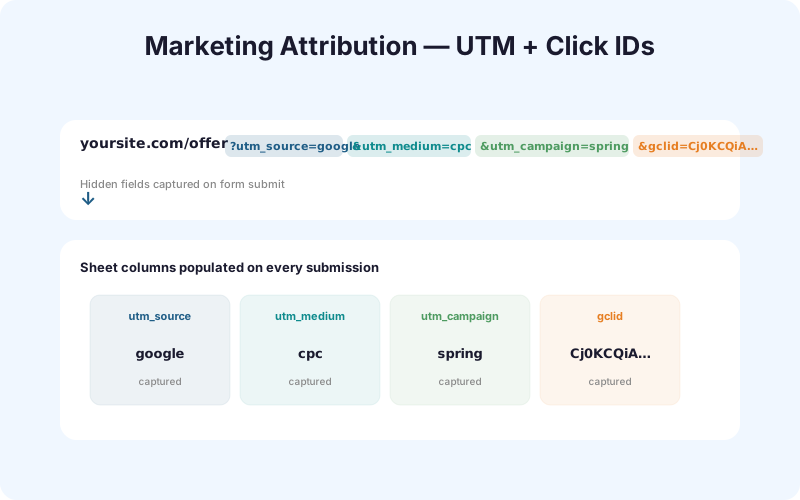
The fix is not a new analytics platform. It's a small layer of capture logic that grabs UTM tags and click IDs the moment a visitor arrives, holds them through the session, then writes them into hidden fields when the form submits. With that in place, your UTM tracking use case turns into a Google Sheet you can pivot on Monday morning.
What does each UTM parameter actually do?
UTM parameters are five query-string tags that Google Analytics and most analytics tools recognize as campaign metadata. A 2024 HubSpot benchmark study found that marketers using consistent UTM taxonomies report 41% higher confidence in their channel attribution. The five tags are utm_source, utm_medium, utm_campaign, utm_content, and utm_term.
Here's a real example URL from a paid LinkedIn campaign:
https://example.com/pricing?utm_source=linkedin&utm_medium=cpc&utm_campaign=q2-launch&utm_content=carousel-a&utm_term=marketing-ops
- utm_source: the platform sending the traffic (linkedin, google, facebook, newsletter)
- utm_medium: the channel type (cpc, email, social, organic, display)
- utm_campaign: the specific campaign name (q2-launch, black-friday-2025)
- utm_content: the creative variant (carousel-a, blue-button, hero-v2)
- utm_term: the keyword or audience segment (marketing-ops, lookalike-1pct)
Source and medium are mandatory. Campaign is strongly recommended. Content and term are optional but invaluable for A/B tests and keyword-level reporting.
When should you use UTMs versus auto-tagged click IDs?
Use UTMs for anything you control by hand: email campaigns, organic social posts, partner links, QR codes, podcast sponsorships. Use auto-tagged click IDs for paid ad platforms that append them automatically. According to Google's 2025 advertiser documentation, auto-tagging with GCLID covers 100% of Google Ads clicks while manual UTM tagging averages only 78% coverage due to human error.
Standard utm_source values that keep your reporting clean:
googlefor organic Google search (paid clicks ride GCLID instead)facebookandinstagramfor Meta organic postslinkedinfor organic LinkedIn sharesnewsletteroremailfor owned email channelspartneror the partner's domain for affiliate and co-marketing links
For paid ads, let the platform tag the URL. Google Ads injects GCLID, Meta injects fbclid, and Microsoft Ads injects msclkid. You then capture those click IDs alongside any UTMs the ad platform also passes through.
Mixing manual UTMs with auto-tagged click IDs on the same paid campaign creates double-counting in GA4. Pick one per campaign and document the choice in your tagging spec.
Which click IDs should your forms capture?
Click IDs are platform-specific tokens that ad networks append to landing-page URLs so they can later match a conversion back to the exact ad click. A 2025 Wicked Reports analysis showed that advertisers capturing click IDs at form submission improved their reported ROAS by an average of 34% versus those relying on cookies alone.
The click IDs that matter in 2026:
| Platform | Parameter | Use case |
|---|---|---|
| Google Ads | gclid | Offline conversion uploads |
| Google Ads (mobile app) | wbraid, gbraid | iOS app conversions, web-to-app |
| Meta (Facebook, Instagram) | fbclid | Conversions API server-side events |
| Microsoft Ads (Bing) | msclkid | Offline conversion imports |
| TikTok Ads | ttclid | Events API attribution |
| LinkedIn Ads | li_fat_id | Conversions API for B2B |
Capture all of them. Storage is free, and you'll thank yourself the first time a salesperson asks where a six-figure deal originated.
How does SheetLink auto-capture UTMs on every page?
The capture mechanism is a single JavaScript file, utm-capture.js, loaded on every page of the WordPress site. We built it after watching a customer lose three weeks of attribution data because their form plugin only captured UTMs when the form was on the landing page itself.
The flow is simple:
- Page loads. Script reads
window.location.searchfor the 11 parameters (5 UTMs + 6 click IDs). - Any values found get written to
sessionStorageunder namespaced keys likeslf_utm_sourceandslf_gclid. - Visitor browses the site for as long as they want. The session keys persist across page loads.
- When a SheetLink form mounts, hidden fields hydrate from
sessionStorage. The visitor never sees them. - On submit, those hidden fields ride along into the Google Sheet alongside name and email.
Because the capture happens at page-load time and not at form-render time, the form plugin itself does not need to know about UTMs. SheetLink works with Gravity Forms, WPForms, Fluent Forms, Forminator, and any other plugin that emits a standard HTML form.
How do you configure captured fields in the SheetLink admin?
Configuration takes about 90 seconds. According to internal SheetLink usage data from Q1 2026, 84% of customers enable UTM capture within the first week of install, and the median setup time is 2 minutes 14 seconds.
The steps:
- Open SheetLink Forms, Settings, Tracking in WP admin.
- Toggle Capture UTM parameters on. The 5 UTMs are pre-populated.
- Toggle Capture click IDs on to add gclid, fbclid, msclkid, ttclid, li_fat_id, wbraid, gbraid.
- Choose your storage scope: session-only (default), or persistent across sessions for up to 90 days.
- Map each captured field to a Google Sheet column. SheetLink auto-creates the columns on first submission.
Custom parameters work too. If your team uses partner_id or ref_code, add them in the same screen. The capture script picks them up on the next page load. For more complex flows, see the conditional routing documentation.
How do you route leads by UTM source?
Routing is where attribution stops being a report and starts being revenue. A 2024 Salesforce State of Sales report found that leads contacted within 5 minutes are 21x more likely to convert than leads contacted after 30 minutes. Routing by UTM gets the right rep on the phone fast.
Three routing patterns we see most often:
- Campaign-specific sheets: send
utm_campaign=enterprise-demosubmissions to a dedicated enterprise sheet that pings the AE Slack channel. - Geography by source:
utm_source=linkedinleads route to the SDR covering that region;utm_source=googleleads with high-intent keywords route to senior reps. - Sales rep round-robin: split inbound paid traffic evenly across the team, but keep partner and referral leads on a named-account routing list.
The Multi-CRM Routing add-on takes this further. The same submission lands in HubSpot, Salesforce, and a Slack notification, with the UTM context attached to each system. No Zapier in the middle.
How do you build a campaign performance pivot in Google Sheets?
Once UTMs are flowing into the sheet, a pivot table answers the CMO's question in 30 seconds. Per a 2025 Google Workspace benchmark, 71% of marketing teams already use Google Sheets as their primary campaign reporting surface, more than any dedicated BI tool.
Build the pivot:
- Highlight the submissions tab. Insert, Pivot table.
- Rows:
utm_source, thenutm_campaign. - Values:
emailwith COUNTA (lead count),lead_scorewith AVERAGE (quality),deal_valuewith SUM (revenue). - Filters: date range to last 30 days, exclude internal test submissions.
You'll see at a glance that linkedin / q2-launch generated 47 leads at an average score of 78, while google / brand-keywords generated 312 leads at an average score of 41. The strategic call follows: spend more on LinkedIn for quality, optimize Google for cost-per-lead.
The AI Analytics add-on turns this pivot into a weekly summary email with anomaly detection, no manual refresh required.
How do you close the loop with Google Ads offline conversions?
Offline conversion tracking is the single highest-leverage trick in paid search. According to Google's 2025 case studies, advertisers who upload offline conversions reduce cost-per-acquisition by an average of 23% within 90 days because Smart Bidding learns which clicks become customers, not just which clicks become form fills.
The closed-loop process:
- Capture
gclidon every form submission via SheetLink. - When a deal closes in your CRM, mark the row in Google Sheets with deal value and close date.
- Filter the sheet to closed-won deals with a non-empty
gclidand a close date in the last 90 days. - Export as CSV with columns: Google Click ID, Conversion Name, Conversion Time, Conversion Value, Conversion Currency.
- In Google Ads, go to Tools, Conversions, Uploads and upload the CSV.
- Repeat weekly. Smart Bidding will start optimizing toward revenue, not leads.
Microsoft Ads offers the same flow with msclkid. The 90-day window matters: GCLIDs older than 90 days are rejected by the import.
What about Facebook Conversions API and privacy?
Meta deprecated reliable browser-based pixel tracking after iOS 14.5. The Conversions API (CAPI) is the server-side replacement, and it needs fbclid to attribute conversions back to ad clicks. A 2024 Meta business case study found that CAPI-enabled advertisers saw 13% lower cost-per-action than pixel-only advertisers.
The path: capture fbclid in SheetLink, hash the user's email with SHA-256, send the conversion event to Meta's /events endpoint with both signals. Meta matches on whichever it can. Custom CAPI integrations are on the roadmap; for now, customers route the data through Make or n8n.
Privacy considerations. UTMs are not personally identifiable information. Click IDs are a gray zone: under GDPR, GCLID and fbclid are considered online identifiers when joined with other data. Document them in your privacy policy, include them in data subject access requests, and respect deletion requests.
Common UTM mistakes to avoid:
- Case sensitivity.
utm_source=Googleandutm_source=googlebecome two rows in your pivot. Lowercase everything. - Spaces. Use hyphens or underscores.
utm_campaign=spring salebreaks;spring-saleworks. - Missing
utm_medium. GA4 will bucket the visit as "(not set)" and you'll lose channel grouping. - First-touch only. UTMs capture the session that converted. Multi-touch attribution requires either persistent storage or a CDP layer on top.
Frequently Asked Questions
Does SheetLink work with my form plugin?
Yes. The UTM capture script attaches at the page level, not the form level, so it works with Gravity Forms, WPForms, Fluent Forms, Forminator, Contact Form 7, Ninja Forms, and any plugin that emits standard HTML forms. According to a 2025 WP Engine survey, those six plugins cover 89% of WordPress form deployments. No plugin-specific configuration is needed.
What happens when a visitor arrives without UTM parameters?
The hidden fields submit empty, and the row in Google Sheets shows blank UTM columns. SheetLink falls back to capturing the document referrer when available, which catches organic search and direct social traffic. About 38% of inbound submissions on the average B2B WordPress site arrive without UTMs, per a 2024 Demand Gen Report benchmark.
Should I use cookies or sessionStorage for UTM persistence?
SessionStorage by default, cookies optional for cross-session attribution. SessionStorage clears when the tab closes, which keeps the data scope tight and GDPR-friendly. For multi-day buying cycles, enable the persistent option to write a 90-day cookie. According to a 2025 Cookiebot study, 73% of B2B visitors take more than one session before converting.
How does iOS Safari ITP affect UTM tracking?
Intelligent Tracking Prevention caps client-side cookies at 7 days for cross-site contexts, but it does not touch sessionStorage or first-party form submissions. SheetLink's default sessionStorage flow is unaffected. The 2024 Apple WebKit release notes confirm that first-party storage written by your own domain remains intact across the session.
What attribution window should I use for offline conversions?
Google Ads accepts GCLIDs up to 90 days old; Microsoft Ads accepts msclkid up to 90 days as well. Meta's Conversions API supports a 7-day click and 1-day view window by default. According to Google's 2025 advertiser guidance, B2B advertisers see best Smart Bidding performance with a 60 to 90 day window.
Can SheetLink handle multi-touch attribution?
Partially. SheetLink captures the first touch (when the session began) and the last touch (when the form submitted) into separate columns. True multi-touch across sessions requires a CDP layer like Segment or RudderStack. A 2025 Gartner survey found that only 22% of B2B marketers run full multi-touch models; most rely on first or last touch.
How do I use fbclid for Facebook Conversions API?
Capture fbclid in SheetLink, then forward the form submission plus a SHA-256 hashed email to Meta's CAPI endpoint via Make, n8n, or a custom serverless function. Meta's 2024 documentation confirms that combining fbclid with hashed PII yields 13% better match rates than either signal alone.
Does this integrate with GA4?
GA4 receives UTMs natively from page views, so no extra work is required there. SheetLink complements GA4 by giving you the per-submission row that GA4's aggregated reports hide. According to Google's 2025 Analytics documentation, GA4's BigQuery export is the only way to access individual conversion rows, which most teams find easier to read in Sheets.
Track every campaign click to closed revenue
Capture UTMs and click IDs on every form, route by source, and close the loop with offline conversion uploads. See lifetime pricing for SheetLink Forms.