
Conditional Lead Routing: Hot Leads to CRM, Rest to Sheets
Route qualified, high-value leads straight to your CRM so sales picks up fast, while every submission still lands in Google Sheets for the record. Here is how to set it up in WordPress without Zapier.
In This Guide
- What Is Conditional Lead Routing?
- Why Does Speed-to-Lead Make This Worth Doing?
- What Counts as a Hot Lead?
- How Do You Set Up Hot-Lead Routing in WordPress?
- Does Every Lead Still Reach Google Sheets?
- Route Everything to CRM, or Split Conditionally?
- Can You Fan a Hot Lead Out to Multiple CRMs at Once?
- How Do You Preserve Attribution When Routing?
- What Happens If the CRM Is Down When a Hot Lead Arrives?
- How Does This Scale Across Many Sites?
- Frequently Asked Questions
What Is Conditional Lead Routing?
Conditional lead routing sends each form submission to a different destination based on its field values or score. Hot leads, like an enterprise budget or a demo request, go straight to your CRM so sales acts fast. Speed matters: contacting a web lead within 5 minutes makes you about 21x likelier to qualify it than waiting 30 minutes, per HBR (2011).
The rest, the newsletter sign-ups and low-intent questions, still log to Google Sheets for the record. Nothing is lost. You separate the leads worth a fast human response from the ones that just need to sit on file.
This is destination routing, not tab routing. We are deciding which system a lead lands in, not which sheet tab. If you want to split rows across tabs, see our conditional routing to Google Sheets guide.
Why Does Speed-to-Lead Make This Worth Doing?
Speed-to-lead is the single biggest reason to route hot leads straight to a CRM. Most companies are slow: in a study of 114 B2B firms, average email response was 11 hours 54 minutes and average phone response was 14 hours 29 minutes, with essentially none replying inside 5 minutes, per Workato (2019-2020).
That gap is your opportunity. When a high-value lead hits your CRM in seconds, a rep can call while the prospect is still on your site. The same lead sitting in a spreadsheet, checked twice a day, goes cold.
Think about the cost of waiting. The HBR research found contacting within 5 minutes versus 30 minutes makes you roughly 100x likelier to even make contact. Routing decides whether your best leads get that fast touch or wait for a manual export.
Low-intent leads do not need that urgency. They belong in Sheets, where they cost nothing to store and can be nurtured later.
What Counts as a Hot Lead?
A hot lead is one your routing rules flag as sales-ready, usually by a field value or a calculated score. There is no universal definition, so you set the thresholds. The point is to act on the ones most likely to convert, since web leads decay fast and B2B contact data decays about 22.5 percent per year, per HubSpot (citing MarketingSherpa).
Common hot-lead signals include:
- Budget or company size above a threshold (for example, budget over $10,000 or 50+ employees). - Intent fields like "Request a demo" or "Talk to sales" instead of "General question." - A computed lead score from the AI Lead Scoring add-on crossing a cutoff. - Source signals, such as a paid-search visitor carrying a GCLID, which often converts at a higher rate.
You can combine these. A rule like "intent equals demo AND budget over $5,000" routes only the leads worth an immediate call, while everything else stays in Sheets.
How Do You Set Up Hot-Lead Routing in WordPress?
You set up hot-lead routing with a conditional rule that fires only when a field matches your criteria. SheetLink Forms reads the submitted field values, evaluates your conditions, and dispatches to the matching destination. It is a direct integration, with no Zapier in the middle, which matters because Zapier meters per task and fanning one lead to six CRMs can burn 6+ tasks, per Zapier (2026).
The core setup has four steps:
- Connect Sheets once. Deploy the free Google Apps Script webhook so every submission logs there. Our Google Sheets setup guide walks through it. - Add the Multi-CRM Routing add-on. This unlocks HubSpot, Salesforce, Pipedrive, Zoho, Mailchimp, and ActiveCampaign as destinations. - Write the condition. Choose a field, an operator (equals, greater than, contains), and a value. - Map the CRM fields. Match form fields to CRM properties so the lead arrives complete.
When the rule matches, the lead goes to both the CRM and Sheets. When it does not, only Sheets receives it.
Does Every Lead Still Reach Google Sheets?
Yes. Every submission writes to Google Sheets regardless of whether it also routes to a CRM. The Sheet is your complete, permanent record. The CRM only receives the leads your conditions flag as hot. This split keeps your CRM clean while preserving full audit history, which matters since the CRM market reached about $73.4 billion in 2024 partly because clean pipelines drive revenue, per Grand View Research (2024).
Why keep both? Sales teams hate cluttered CRMs. If every newsletter sign-up creates a contact, reps lose trust in the data and ignore it. Routing only qualified leads keeps the pipeline meaningful.
Meanwhile, the Sheet captures everything for marketing analysis, deduplication, and reporting. You can build dashboards on the full dataset, as covered in our Google Sheets dashboards guide, without polluting the systems your sales team relies on daily.
Route Everything to CRM, or Split Conditionally?
Sending every lead to your CRM feels simpler, but it creates the clutter problem fast. With B2B data decaying about 22.5 percent per year, per HubSpot (citing MarketingSherpa), a CRM stuffed with low-intent contacts decays into noise quickly. Conditional split keeps it focused. Manual triage, the third option, is too slow to matter for speed-to-lead.
The table below compares the three approaches. We have found the conditional split wins for most lead-gen sites: it gives sales the fast, qualified leads while marketing keeps the full picture in Sheets.
Manual triage, where someone reviews each submission and decides where it goes, defeats the purpose. By the time a human sorts the inbox, the 5-minute window is long gone. Automating the decision is the entire value of routing.
If you genuinely want every lead in the CRM and only need the spreadsheet as backup, that is valid too. But for most teams, the split is the sweet spot.
Can You Fan a Hot Lead Out to Multiple CRMs at Once?
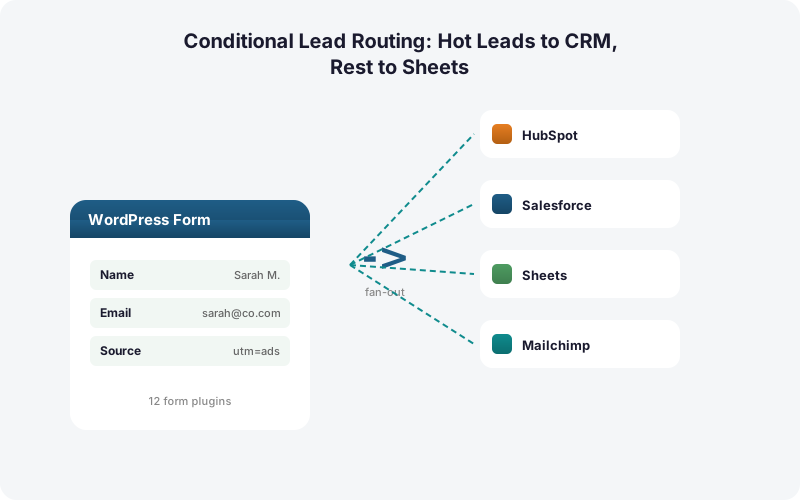
Yes. The Multi-CRM Routing add-on ($49/mo) fans a single submission to HubSpot, Salesforce, Pipedrive, Zoho, Mailchimp, and ActiveCampaign simultaneously, plus Google Sheets, with no per-task fees. That matters because Zapier charges per action, so a six-CRM fan-out costs 6+ tasks per lead, per Zapier (2026).
Why fan out at all? Many teams run sales in one CRM and marketing automation in another. A hot lead might go to Salesforce for the rep and Mailchimp for the nurture sequence at the same instant. Conditional routing decides not just whether a lead is hot, but which systems it touches.
This instant fan-out beats a nightly CRM sync by a wide margin. A scheduled import means your hottest lead waits hours for the next batch. Direct, real-time delivery puts the lead in front of sales while the intent is fresh. For the cost math against middleware, see our Zapier cost breakdown.
How Do You Preserve Attribution When Routing?
Routing should carry attribution data with the lead, not strip it. SheetLink Forms automatically captures UTM parameters and click IDs (GCLID, fbclid, msclkid) on every submission. Passing the GCLID into your CRM is how you attribute and later import offline conversions back to the campaign, per Google Ads Help (current).
This closes the loop. When a hot lead routes to your CRM with its GCLID intact, you can report which ad and keyword produced the deal, not just the click. That turns your CRM into a source of truth for ad spend decisions.
Map these hidden fields into your CRM just like any visible field. The Sheet copy keeps the same attribution data for marketing analysis. Our UTM and GCLID attribution guide covers the full setup and how to feed offline conversions back to Google Ads.
What Happens If the CRM Is Down When a Hot Lead Arrives?
If your CRM is briefly unreachable, the lead is not lost. SheetLink Forms uses a built-in retry queue with exponential backoff, retrying at 5 minutes, 30 minutes, and 2 hours, with full delivery logs. This local-queue model is more reliable than middleware that depends on a third party staying up, which matters when companies juggle an average of about 106 SaaS apps each, per BetterCloud via Statista (2024).
The Sheet write and CRM write are tracked independently. If Sheets succeeds but the CRM fails, only the CRM delivery retries. You see exactly what happened in the delivery log.
This matters for hot leads specifically. A failed delivery that silently disappears could cost a high-value deal. The retry queue means a transient CRM outage delays the lead by minutes, not loses it entirely. Your fast-response advantage survives the occasional API hiccup.
How Does This Scale Across Many Sites?
Conditional CRM routing scales cleanly because there are no per-lead or per-task fees to multiply. With Zapier's metered model, fanning leads to multiple CRMs across many client sites compounds fast at 6+ tasks per lead, per Zapier (2026). A one-time-license plugin avoids that entirely.
For agencies, this is decisive. Each client can have its own routing logic, its own CRM destinations, and its own thresholds, all managed from WordPress. There is no shared automation account to untangle when a client leaves.
The agency licensing covers many sites under one purchase, and the White-Label add-on lets you present the integration under your own brand. Compared to per-task SaaS, the savings grow with every client and every lead. See the full middleware-versus-direct math in our true cost comparison.
| Approach | Speed to Sales | CRM Cleanliness | Full Record Kept | Best For |
|---|---|---|---|---|
| Route everything to CRM | Fast | Cluttered with low-intent contacts | In CRM only | Tiny lead volume |
| Conditional split (CRM + Sheets) | Fast for hot leads | Clean, qualified only | Yes, all in Sheets | Most lead-gen sites |
| Manual triage | Slow, misses 5-min window | Depends on the human | Wherever it ends up | Very low volume only |
Frequently Asked Questions
What is the difference between this and routing to Sheet tabs?
Tab routing splits rows into different tabs of the same spreadsheet. Destination routing, covered here, decides which system a lead enters: your CRM, Google Sheets, or both. Hot leads go to the CRM for fast sales follow-up while everything still logs to Sheets as the permanent record.
Do low-value leads still get saved somewhere?
Yes. Every submission writes to Google Sheets regardless of routing. Only the leads your conditions flag as hot also reach the CRM. Nothing is discarded. The Sheet stays your complete record for marketing analysis, deduplication, and reporting, while the CRM holds only qualified, sales-ready contacts.
How fast does a routed lead reach my CRM?
Delivery is real time, typically within a couple of seconds, because SheetLink Forms posts directly to the CRM with no middleware polling. That speed matters: contacting a web lead within 5 minutes makes you roughly 100x likelier to make contact than waiting 30 minutes, per HBR (2011).
Which CRMs can I route hot leads to?
The Multi-CRM Routing add-on supports HubSpot, Salesforce, Pipedrive, Zoho, Mailchimp, and ActiveCampaign. You can route to one or fan a single lead out to several at once, alongside Google Sheets, with no per-task fees. Airtable and Notion are available via the Integrations Bundle add-on.
Can I route based on a lead score instead of a single field?
Yes. Pair the AI Lead Scoring add-on with conditional routing to send only leads above a score threshold to your CRM. You can also combine conditions, such as score plus intent field, so only genuinely sales-ready leads trigger a fast human response while the rest stay in Sheets.
Does routing keep my UTM and GCLID data?
Yes. SheetLink Forms captures UTMs and click IDs (GCLID, fbclid, msclkid) automatically and maps them into your CRM with the lead. Passing the GCLID is how you attribute and import offline conversions back to the campaign, per Google Ads Help. The Sheet copy keeps the same attribution data.
What if my CRM is down when a hot lead comes in?
The lead is queued and retried automatically with exponential backoff at 5 minutes, 30 minutes, and 2 hours, with full delivery logs. The Sheet write and CRM write are tracked separately, so a transient CRM outage delays the lead by minutes rather than losing it.
Is this cheaper than building the same flow in Zapier?
Usually, yes. Zapier meters per action, so fanning one lead to six CRMs can cost 6+ tasks per lead, per Zapier (2026). SheetLink Forms charges no per-task fees, so cost stays flat as volume and the number of CRM destinations grow. The savings compound across high-traffic and multi-site setups.
Get Hot Leads to Sales in Seconds
Route qualified leads straight to your CRM while everything logs to Google Sheets. No Zapier. No per-task fees. One direct WordPress integration.