
Agency Dashboard: Manage 25 Client Sites From One View
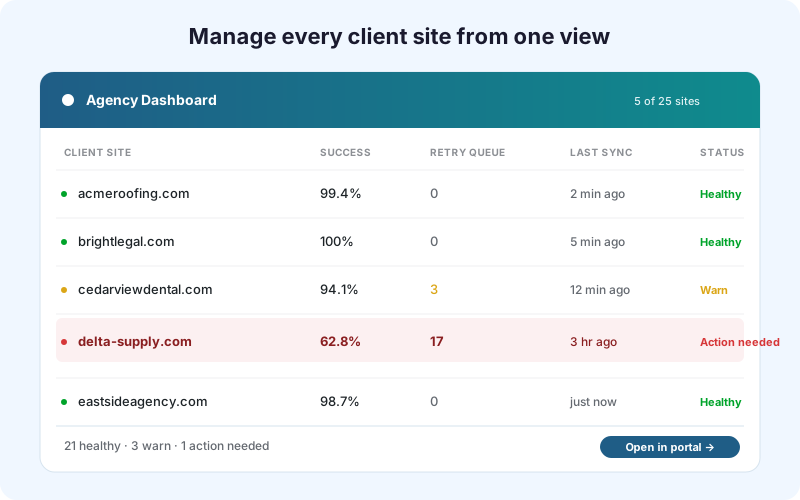
Stop bouncing between 25 wp-admin tabs. The Agency Dashboard aggregates submission volume, delivery health, retry queue depth, and license status across every client site licensed under your key - directly in the customer portal at sheetlinkwp.com/account/. No WordPress login needed.
Key Benefits
One Pane of Glass
Every client site's submission volume, success rate, retry queue depth, and last-sync timestamp aggregated into a single view. Spot the broken site in seconds instead of clicking through 25 wp-admin tabs.
No WordPress Login Required
Sign in to the customer portal with a magic link - the dashboard pulls data directly from our backend. You can manage 100 client sites without ever opening their WordPress admin.
License Seat Management
Activate, deactivate, and reactivate per-site license slots from the dashboard. Onboard a new client by activating a slot; offboard by deactivating - all without logging into the client's WordPress.
Multisite Network Aware
WordPress Multisite networks count as one parent in the dashboard with per-subsite rules tracked underneath. A 50-site network shows up as one row you can drill into, not 50 separate entries to monitor.
Health Monitoring
Auto-flagged sites where success rate drops below threshold or where the retry queue grows unexpectedly. Catch a re-deployed Apps Script that broke the trigger before the client notices.
How It Works
Every site licensed under your account reports submission counts, delivery success and failure rates, retry queue depth, and active feature toggles to the SheetLink backend on a continuous basis. The Agency Dashboard at sheetlinkwp.com/account/ queries that telemetry and presents it as a sortable, filterable table. Clicking a site row reveals last-7-day trend lines, recent delivery log entries, and inline controls to deactivate the slot or generate a branded report. The dashboard appears automatically for any account that has at least one Agency, Agency Plus, or Enterprise license - no enable toggle needed. The in-WordPress SheetLink → Agency page still exists for when you are already inside a client site, but the portal dashboard shows every client at once and is the right tool for portfolio-level workflows.
Real-World Use Cases
25-Site WordPress Agency
A 20-person agency manages 45 client WordPress sites with two Agency Plus licenses. Every Monday morning, the operations lead checks the dashboard for any client whose success rate dropped below 95% during the previous week - usually a re-deployed Apps Script that broke. Issues caught proactively before the client emails support.
Client Onboarding and Offboarding
Onboarding a new client takes 15 minutes per site: install plugin, activate license slot from the dashboard, paste the client's Apps Script webhook, configure routing. Offboarding is even faster: deactivate the slot, return it to the available pool, hand over the Apps Script - the client takes their data with them.
Multi-Network Operations
An education-sector agency runs three WordPress Multisite networks totaling 80 subsites. The dashboard shows each network as one parent with per-subsite rule status underneath. The agency lead manages all 80 subsites from one screen instead of three separate Multisite admin consoles.
Feature Comparison
| Workflow | Without Agency Dashboard | With Agency Dashboard |
|---|---|---|
| Check delivery health across all clients | Log into 25 wp-admin tabs | One portal view, sorted by status |
| Spot a broken Apps Script | Wait for client to report it | Auto-flagged when success rate drops |
| Activate a new client site | Each site enters its own key | Activate slot from dashboard, no WP login |
| Multisite network monitoring | Bounce through Network Admin | Network rolls up as one row with subsite drill-in |
| License seat tracking | Manual spreadsheet of who has what | Live count with one-click deactivate |
| Client offboarding | Manual deactivation per site | 60-second slot release from portal |
Frequently Asked Questions
Is the Agency Dashboard a paid add-on?
No. The Agency Dashboard is included automatically with any Agency, Agency Plus, or Enterprise license - it appears in the customer portal at sheetlinkwp.com/account/ as soon as one of those licenses is on your account. It is not sold separately and there is no toggle to enable. The Freelancer and single-site tiers do not include it because the dashboard is a portfolio tool that only makes sense when you are managing multiple client sites.
Does it work with WordPress Multisite?
Yes. A WordPress Multisite network counts as one parent in the dashboard, with per-subsite rules and status tracked underneath. Network-level activation slots count against the same Agency or Enterprise pool. License seats count per individual site (a 25-seat plan covers 25 individual Multisite subsites, not 25 networks). See Agency Licensing for activation details.
Can clients see the Agency Dashboard?
No. The Agency Dashboard lives in the agency's customer portal account, scoped to the agency's license key. Clients do not have portal access by default. If you want to share data with clients, use the Branded Reports feature, which generates downloadable HTML reports per site - branded with your agency logo and accent color via the White-Label add-on if installed.
What is the difference between the dashboard in WordPress and the one in the portal?
The in-WordPress SheetLink → Agency page (visible inside any client wp-admin where SheetLink is installed and a qualifying license is active) shows data scoped to that single site. The customer portal Agency Dashboard at sheetlinkwp.com/account/ aggregates across every site licensed under your key. The in-WP version is right when you are already inside a client site for other reasons; the portal version is right for portfolio-level workflows. Both pull from the same telemetry.
Is data pushed continuously, or pulled on-demand?
Telemetry pushes from each licensed site to the SheetLink backend continuously - every successful delivery, retry-queue change, and license event. The dashboard reads from that backend on each portal page load. There is no fixed cache window; data you see is at most a few seconds stale. The dashboard does not need to reach into the client WordPress site to render.
Do I need to install anything extra to enable the dashboard?
No. Activate a qualifying license (Agency, Agency Plus, or Enterprise) on at least one site, sign in at sheetlinkwp.com/account/ with the email used to purchase, and the Agency tab is automatically visible. The plugin already reports the telemetry the dashboard needs - no additional add-on, configuration, or feature toggle is required.
Manage every client site from one view
Stop bouncing between wp-admin tabs. Agency, Agency Plus, and Enterprise licenses include the dashboard at sheetlinkwp.com/account/.