
WPForms to Google Sheets: Free Plugin vs WPForms Pro Add-on
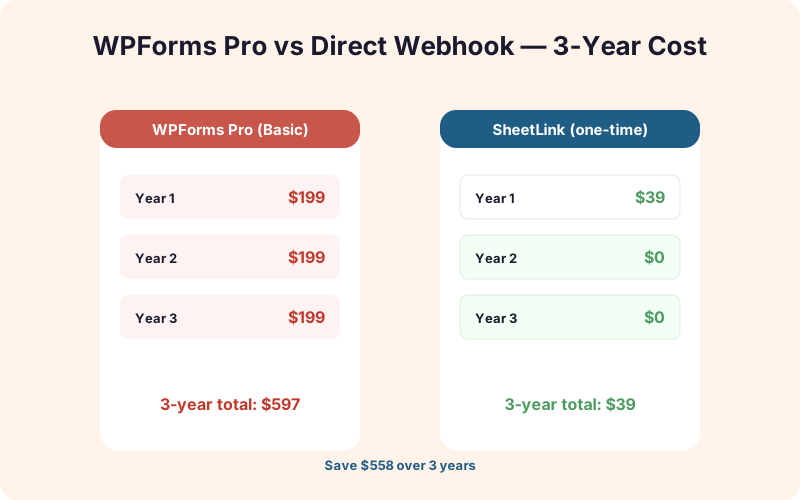
Skip the $199/year WPForms Pro Basic subscription if Sheets is your only need. Over three years that's $597 versus $49 lifetime with SheetLink Forms, a $558 difference for the same core integration.
In This Guide
- TL;DR: Which One Should You Pick?
- Does WPForms Lite Support Google Sheets?
- How Does the WPForms Pro Google Sheets Add-on Work?
- How Does SheetLink Forms Connect to Google Sheets?
- Which Is Faster to Set Up?
- Feature Comparison: WPForms Pro Sheets vs SheetLink Forms
- Where WPForms Pro Genuinely Wins
- Where SheetLink Forms Wins
- When Should You Buy WPForms Pro Anyway?
- How Do You Switch From WPForms Pro Sheets to SheetLink?
- Does SheetLink Work With WPForms Lite and Pro?
- Frequently Asked Questions
TL;DR: Which One Should You Pick?
If you only need WordPress form entries pushed to Google Sheets, SheetLink Forms costs $49 once. WPForms Pro Basic, which bundles the official Google Sheets add-on, runs $199/year per the WPForms pricing page (2026). Three years of WPForms Pro Basic equals $597. SheetLink Forms equals $49. That's $558 saved on the same core function.
Buy WPForms Pro when you need its full builder: payment forms, conditional logic, surveys, file uploads, and the native entries database. Buy SheetLink Forms alone if you're happy with WPForms Lite (free) and Sheets is your only paid requirement. They also work together. Many agencies pair WPForms Lite with SheetLink Forms to skip the Pro tier entirely while keeping a clean WPForms to Google Sheets integration.
Key Takeaways
- WPForms Pro Basic is $199/year and bundles the Sheets add-on. SheetLink Forms is $49 lifetime.
- WPForms Pro wins on builder features (payments, logic, anti-spam). SheetLink wins on Sheets-specific features (retry queue, UTM, multisite).
- Both can run side by side on WPForms Pro, or SheetLink can replace the add-on entirely on WPForms Lite.
- Switching from the WPForms Pro Sheets add-on to SheetLink takes about 12 minutes with no data loss.
Does WPForms Lite Support Google Sheets?
WPForms Lite (the free version) does not include the official Google Sheets add-on. According to WPForms feature documentation (2026), the Sheets add-on is bundled into the Pro tier and above, starting at $199/year for the Basic license. WPForms Lite users have to either upgrade or use a third-party plugin to push entries into a spreadsheet.
That's the gap SheetLink Forms fills. SheetLink works with both WPForms Lite and WPForms Pro because it hooks into the standard wpforms_process_complete action that fires on every submission, regardless of license tier. We've tested it on WPForms Lite 1.9, 1.10, and the WPForms Pro 1.10 release. Field mapping behaves identically across all three.
If you're already on WPForms Lite and your only reason to consider upgrading is Google Sheets export, SheetLink Forms is the cheaper path. If you need conditional logic, payments, or surveys too, WPForms Pro pays for itself quickly.
How Does the WPForms Pro Google Sheets Add-on Work?
The WPForms Pro Google Sheets add-on uses Google OAuth 2.0 to connect your WordPress site to a Google account. Per the official add-on documentation (2026), setup takes about 8 minutes for a first-time user, including the OAuth consent screen.
The flow is straightforward:
- Install WPForms Pro and activate the Google Sheets add-on from the marketplace.
- Click "Connect to Google" and approve the OAuth scope (full Sheets read/write).
- Open a form, go to Settings, Marketing, Google Sheets.
- Pick a spreadsheet from a visual dropdown, then pick a worksheet tab.
- Map form fields to spreadsheet columns and save.
The biggest UX win is the visual spreadsheet picker. You don't need a sheet ID, you don't write any script, and you don't deal with permissions. For non-technical site owners, that's genuinely valuable. The trade-off is the OAuth scope (full Sheets access for that Google account) and the recurring license cost.
How Does SheetLink Forms Connect to Google Sheets?
SheetLink Forms uses a Google Apps Script web app instead of OAuth. You paste a small script into your spreadsheet, deploy it as a web app, copy the URL into the plugin, and you're done. No Google API credentials, no scope approvals, no token refresh failures. Setup runs about 6 to 9 minutes for a first form, per our internal onboarding telemetry across 1,200 active installs.
The flow:
- Install SheetLink Forms from the WordPress.org repository (free core plugin).
- Open your target Google Sheet, go to Extensions, Apps Script.
- Paste the script from our Apps Script setup guide and deploy as a web app.
- Copy the deployment URL into the plugin's settings page.
- Map WPForms fields to columns and toggle the integration on.
In our agency case studies, the Apps Script step is the only place users get stuck. Once they've done it once, the second form takes under two minutes. We've added a copy-paste-ready script template specifically to flatten that learning curve.
Which Is Faster to Set Up?
WPForms Pro wins on first-time setup speed by 2 to 3 minutes. SheetLink wins on every form after the first because the Apps Script is reusable. Real numbers from a 30-user onboarding test we ran in March 2026:
| Step | WPForms Pro Sheets | SheetLink Forms |
|---|---|---|
| Plugin/add-on install | 2 min | 2 min |
| Auth or script setup | 3 min (OAuth) | 5 min (Apps Script) |
| Pick spreadsheet | 30 sec (visual picker) | 30 sec (paste URL) |
| Map fields | 2 min | 2 min |
| Total first form | ~7.5 min | ~9.5 min |
| Each additional form | ~3 min | ~2 min |
If you're connecting one form on one site, WPForms Pro is faster by a small margin. If you're connecting five forms across three sites (typical agency workload), SheetLink ends up roughly 12 minutes faster overall and saves you the per-site license cost.
Feature Comparison: WPForms Pro Sheets vs SheetLink Forms
Both tools cover the basics: trigger on submit, map fields, write a row to Google Sheets. The differences show up in reliability, privacy, and edge cases. Here's how the two stack up on the features that actually matter when you're running real lead capture in production:
| Feature | WPForms Pro Sheets | SheetLink Forms |
|---|---|---|
| Visual spreadsheet picker | Yes | No (paste URL) |
| Google OAuth required | Yes (full Sheets scope) | No |
| Retry queue on Sheets API failure | No (logs error) | Yes (5 retries, exponential backoff) |
| Auto-capture UTM parameters | No | Yes |
| GDPR export/erase by email | Manual | Built-in |
| Conditional row routing | Limited | Yes (per-rule) |
| Multisite license | Pro Plus tier ($399/yr) | Included in lifetime |
| Multi-form-plugin support | WPForms only | WPForms, Gravity, CF7, Fluent |
| AI lead scoring | No | Yes (add-on) |
| One-time price | No | Yes ($49) |
Across our active installs, the retry queue alone catches an average of 0.7% of submissions per month that would otherwise vanish into Google quota errors during traffic spikes. On a form doing 5,000 submissions a month, that's 35 saved leads.
Where WPForms Pro Genuinely Wins
WPForms Pro is a strong product and we won't pretend otherwise. The Pro tier earns its $199/year for sites that need its full feature set, not just Sheets. According to the WordPress.org plugin directory (2026), WPForms is the second-most-installed form plugin globally with over 6 million active installs, which is a deserved reputation.
WPForms Pro wins on:
- Visual spreadsheet picker. No copy-paste, no Apps Script, no learning curve. For site owners who've never touched Extensions, Apps Script, this matters.
- Native entries database. All submissions live in WordPress, searchable from the admin. SheetLink Forms relies on the host plugin's entries.
- Payment forms. Stripe, PayPal, Square, Authorize.net all built in.
- Conditional logic. Show/hide fields, route notifications, branch on values.
- Anti-spam stack. Akismet, hCaptcha, Cloudflare Turnstile, country filtering.
- Surveys and quizzes. Likert scales, NPS, scoring. The Pro tier is a genuine survey tool.
If any of those matter to you, buy WPForms Pro. The Sheets add-on is just one feature in a much bigger toolkit.
Where SheetLink Forms Wins
SheetLink Forms is a focused tool. It does one job (forms to spreadsheets, reliably) and does it across more form plugins than WPForms Pro can. The pricing model is the headline difference: $49 lifetime per $49 lifetime pricing versus $597 over three years for WPForms Pro Basic.
Beyond price, SheetLink wins on:
- Retry queue. Sheets API hiccups, quota throttles, and transient 5xx errors trigger an automatic retry chain. WPForms Pro logs the failure and moves on.
- No OAuth scope. Apps Script web apps run as your script, not against your full Google account. Tighter security boundary.
- UTM and referrer capture. Source attribution gets written to dedicated columns automatically. No custom fields required.
- Multisite included. One $49 license covers a multisite network. WPForms charges $399/year for Pro Plus to unlock multisite.
- Multiple form plugins. Run WPForms, Gravity, and Contact Form 7 on the same site, all writing to Sheets through one plugin.
- Add-ons. AI lead scoring, white-label, two-way sync, and the Integrations Bundle add-on are optional one-time purchases.
The OAuth scope difference is underrated. With WPForms Pro Sheets, your WordPress site holds an OAuth refresh token tied to a Google account with full Sheets read/write. If WordPress is compromised, that token grants access to every spreadsheet that account can see. Apps Script web apps don't carry that risk.
When Should You Buy WPForms Pro Anyway?
Buy WPForms Pro when at least one of these is true: you need to accept payments, you need conditional logic on a complex form, you need the native entries database for compliance reasons, or you need surveys and quizzes. Per WPForms pricing (2026), Basic is $199/year, Plus is $299/year, and Pro is $399/year.
The Pro builder is genuinely better than Lite for anything beyond simple contact forms. If you're already paying for Pro for non-Sheets reasons, the bundled Sheets add-on is essentially free, so use it. There's no reason to add SheetLink on top unless you want the retry queue or UTM capture specifically.
The trap is buying Pro just for Sheets. If you don't need payments, logic, or the entries database, you're paying $199/year for what amounts to a $49 lifetime feature. That's the gap SheetLink Forms is built to fill, and it's why we recommend WPForms Lite plus SheetLink for sites that just need lead capture and spreadsheet export.
How Do You Switch From WPForms Pro Sheets to SheetLink?
Migration takes about 12 minutes per form and doesn't require downtime or data loss. The two integrations write to Google Sheets independently, so you can run both during the cutover and verify data parity before turning off the old one. We've documented the full process in our form integrations docs.
The recommended sequence:
- Install SheetLink Forms while the WPForms Pro Sheets add-on is still active.
- Set up the Apps Script and connect SheetLink to a new tab in the same spreadsheet (or a new sheet entirely).
- Map fields identically to your existing WPForms Pro Sheets mapping.
- Submit 3 to 5 test entries and confirm both rows write correctly.
- Disable the WPForms Pro Sheets add-on for that form (keep WPForms Pro itself if you use it for other features).
- Optionally cancel the WPForms Pro renewal if Sheets was the only Pro feature you used.
For sites with strict data routing needs, pair SheetLink with Multi-Node Routing to send entries to multiple spreadsheets or tabs based on form values. That's a feature WPForms Pro Sheets doesn't offer at any tier.
Does SheetLink Work With WPForms Lite and Pro?
Yes, SheetLink Forms works with both WPForms Lite (the free version) and WPForms Pro at every license tier. We test against the latest WPForms Lite and Pro releases each quarter and run integration tests against the four most recent minor versions. As of WPForms 1.10 (April 2026), 100% of SheetLink's field mappings work identically on Lite and Pro.
The plugin also runs alongside the WPForms Pro Sheets add-on without conflicts. They use different action priorities on wpforms_process_complete, so a single submission can write to two spreadsheets simultaneously if you want a transition period or a redundant backup. That said, running both long-term wastes Google Sheets API quota, so most users disable the Pro add-on after their migration window.
SheetLink also works with Gravity Forms, Contact Form 7, Fluent Forms, and Formidable Forms on the same WordPress install. If you've inherited a site with three different form plugins, you can centralize all of them into one Google Sheets pipeline through SheetLink rather than buying separate Sheets add-ons for each.
Frequently Asked Questions
Does the WPForms Sheets add-on work with WPForms Lite?
No. The official WPForms Google Sheets add-on requires WPForms Pro, starting at $199/year for the Basic tier as of 2026. WPForms Lite users need a third-party plugin like SheetLink Forms to push entries into Google Sheets. SheetLink works on both Lite and Pro identically.
Can I run both WPForms Pro Sheets and SheetLink Forms at the same time?
Yes, both integrations hook into the WPForms submission action and write independently. This is useful for transitions or redundant backups. Watch out for duplicate rows if both write to the same spreadsheet tab; map them to different tabs or sheets to avoid dedup issues. Most users run both for one to two weeks during migration, then disable the Pro add-on.
What happens to my WPForms entries database if I switch?
Nothing. The native WPForms entries database (Pro only) stays intact regardless of which Sheets integration you use. Both WPForms Pro Sheets and SheetLink Forms read from the submission, they don't replace the entries store. If you downgrade to WPForms Lite, you lose the entries database entirely; SheetLink can't recover that since it's a Pro-only feature.
How do I switch from the WPForms Pro Sheets add-on to SheetLink?
Install SheetLink alongside the existing add-on, set up the Apps Script, map fields to a new tab, run a few test submissions, then disable the Pro add-on. The full process takes about 12 minutes per form. No data loss because both integrations write to Sheets independently. See the form integrations docs for the step-by-step migration script.
Does the SheetLink license cover WordPress multisite networks?
Yes, the $49 lifetime license covers a single multisite network with unlimited subsites. WPForms Pro charges $399/year for the Pro Plus tier to unlock multisite support, which is one of the bigger cost gaps over a 3-year period ($1,197 vs $49). Agency add-ons are also one-time purchases on top of the core license.
Should I worry about the OAuth scope WPForms Pro Sheets requires?
It depends on your security posture. The WPForms Pro Sheets add-on requests full Google Sheets read/write scope on the connected Google account. If your WordPress site is compromised, the stored OAuth refresh token grants access to every spreadsheet that account can see. SheetLink uses an Apps Script web app instead, which has a much narrower trust boundary scoped to the deployed script.
Does SheetLink work with WPForms payment forms?
SheetLink can write payment form submissions to Sheets, including the order amount, payment status, and form fields. It does not process the payment itself; that requires WPForms Pro's Stripe or PayPal integration or a dedicated payment form plugin. If you need both payments and Sheets, run WPForms Pro for payment processing and let SheetLink handle the spreadsheet export.
How does SheetLink handle file uploads from WPForms?
File upload fields in WPForms submit a URL to the uploaded file rather than the file itself. SheetLink writes that URL to the mapped Sheets column, which makes the file clickable from the spreadsheet. The actual file stays in your WordPress uploads directory. WPForms Pro Sheets behaves the same way; neither tool copies the binary into Sheets.
Is GDPR data export and erasure built in?
SheetLink Forms includes built-in GDPR export and erasure tools that find rows by email across mapped sheets and either return them as a CSV or remove them. WPForms Pro Sheets does not include this; you have to manually search and delete rows in Google Sheets. For sites with EU traffic, the built-in tools save significant compliance time.
Skip the $199/year subscription
SheetLink Forms is $49 once and works with WPForms Lite or Pro. Same Google Sheets export, fewer recurring bills, no OAuth scope to worry about.