
Gravity Forms to Google Sheets Without Gravity Perks
Gravity Perks bundles a Sheets add-on inside a $59 to $249 yearly license. Here is when that price makes sense, and when a $49 one-time tool covers the same job with tighter OAuth scope.
In This Guide
- Why this comparison matters
- What does Gravity Perks actually cost?
- What is bundled inside Gravity Perks Sheets?
- Why does the OAuth scope matter?
- Is the Apps Script webhook a real alternative?
- How does the SheetLink Forms approach differ?
- What does the setup actually look like?
- How are tricky Gravity Forms field types handled?
- Gravity Perks Sheets vs SheetLink Forms
- Does the performance difference matter at scale?
- How do you migrate without losing data?
- Frequently Asked Questions
Why this comparison matters
Gravity Forms ships without a native Google Sheets export. To bridge the gap, most site owners reach for Gravity Perks, the official Rocketgenius bundle that includes a Sheets add-on alongside 30+ other perks. Perks is a good product. The team behind it ships consistently, the code quality is high, and the Sheets add-on works.
The friction is the recurring cost and the breadth of OAuth scope it requests. A small business sending 200 leads per month does not always need a $159/yr subscription, and security teams flinch at full Sheets scope across an entire Google account. This guide walks through the math, the OAuth tradeoffs, and a $49 one-time alternative. We will also cover when Perks is still the right call, because it often is. For deeper context, see our Gravity Forms to Google Sheets integration overview.
What does Gravity Perks actually cost?
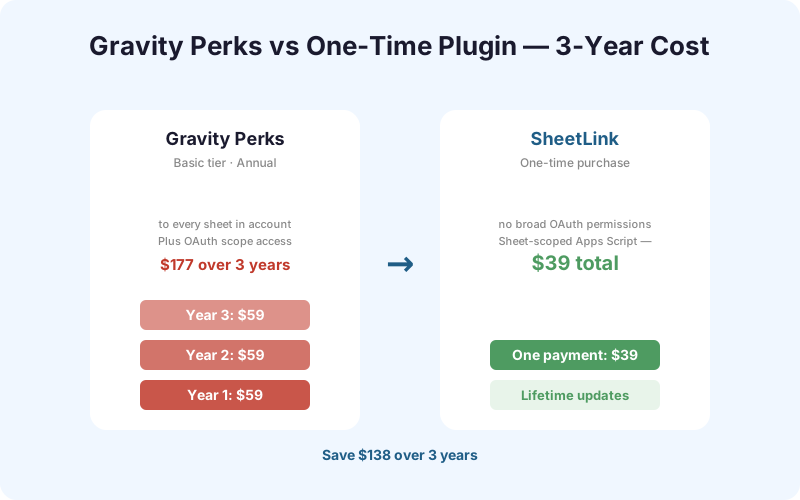
Gravity Perks ships in three tiers. Basic runs $59 per year for a single site. Pro is $159 per year for up to five sites. Elite covers unlimited sites at $249 per year. All three include the Google Sheets perk plus the rest of the perks library. Renewals are at the same price unless promo pricing applies.
Stretched over three years, the numbers add up. Basic totals $177, Pro reaches $477, and Elite hits $747 before any tax. That is on top of the Gravity Forms license itself, which starts at $59/yr for the Basic license and runs up to $259/yr for Elite. A two-license stack at the Pro tier is roughly $318 per year, or $954 over three years.
| Tier | Year 1 | 3-Year Total | Sites |
|---|---|---|---|
| Basic | $59 | $177 | 1 |
| Pro | $159 | $477 | 5 |
| Elite | $249 | $747 | Unlimited |
None of those numbers are unfair for what Perks delivers. The question is whether you actually use the other 30+ perks, or just the Sheets one.
What is bundled inside Gravity Perks Sheets?
The Sheets add-on inside Perks is one of dozens of add-ons in the bundle. You also get GP Populate Anything, GP Limit Submissions, GP Nested Forms (the repeater perk), GP Easy Passthrough, GP Read Only, GP Address Autocomplete, and many more. If your team relies on three or four of these, the math flips quickly in Perks favor.
The standalone path is different. There is no official free Gravity-Forms-to-Sheets plugin from Rocketgenius. Third-party free plugins exist on WordPress.org under names like CF7 to Sheets or generic webhook-to-Sheets bridges, but most either lack Gravity Forms hooks or stopped updating in 2022 to 2023. The reliable options narrow to: Gravity Perks Sheets, a hand-rolled Apps Script webhook, Zapier or Make (per-task pricing), or a purpose-built connector. We compare those tradeoffs in our form integrations docs.
Where Perks earns its keep
If you already use Populate Anything to pre-fill dropdowns from Sheets, or GPNF for nested rows, Perks is doing real work beyond the export. Cancelling to save $59 makes no sense in that scenario.
Why does the OAuth scope matter?
Both Gravity Perks Sheets and most third-party connectors authenticate via Google OAuth. The scope they request is the security-relevant detail. Gravity Perks Sheets requests https://www.googleapis.com/auth/spreadsheets, which is the full read/write Sheets scope across every spreadsheet in the connected Google account. That includes spreadsheets the plugin will never touch.
From a security review angle, this is a yellow flag, not a red one. The token lives in your WordPress database. Anyone with database access or admin access to the site can, in principle, read or write any sheet the connected Google user owns. If the connected account is a personal Gmail belonging to the agency owner, that surface is large.
The mitigation most teams skip: create a dedicated Google Workspace service account whose Drive contains only the spreadsheets that form should write to. Share those sheets with the service account email. Now full Sheets scope is bounded to a handful of files instead of the owner's entire Drive. This is the same pattern enterprise data teams use for BI tools, and it costs nothing beyond five minutes of setup.
Is the Apps Script webhook a real alternative?
Yes, with caveats. Google Apps Script lets you publish a web app bound to a single spreadsheet. The web app accepts POST requests, parses the JSON, and appends a row. Because the script is owned by the spreadsheet, the scope is intrinsically narrow: that script can only touch its parent sheet, not your whole Drive.
You wire it to Gravity Forms with the built-in webhooks add-on (Pro license and up) or a tiny custom snippet on gform_after_submission. The downsides are honest. There is no UI, you write JavaScript, you handle auth tokens or signature headers yourself, and Apps Script has its own quotas (roughly 20,000 URL fetch calls per day on consumer accounts). Any error handling, retries, or field mapping you need, you write.
For a developer who wants the narrowest possible scope and is comfortable in JavaScript, this is the cleanest answer. We walk through the full snippet in the Apps Script setup guide. For everyone else, the maintenance cost adds up. We have inherited three sites where the original Apps Script broke quietly after a Google library deprecation, and nobody noticed for weeks because there was no admin notice.
How does the SheetLink Forms approach differ?
SheetLink Forms takes the middle path. It is a one-time $49 WordPress plugin that uses the same Apps Script web app pattern under the hood, so OAuth scope stays narrow to the target sheet. The plugin generates the script for you, walks you through pasting the deployment URL, and gives you a visual field mapper inside the Gravity Forms editor.
What is bundled in the box: a background retry queue using WordPress cron, UTM and referrer capture, IP and user agent logging (toggleable for GDPR), a duplicate-submission guard, and per-form mapping templates. Multisite support is included at no extra cost. There is no recurring fee, no per-submission charge, and no OAuth token sitting in your database with full Sheets scope.
It does not replace Gravity Perks. It replaces one perk. If you only use the Sheets perk from the Perks bundle, the math is straightforward: $49 one time versus $59 to $249 every year. See $49 lifetime pricing for details. If you also need bulk routing to multiple sheets per form, that lives in the Multi-Node Routing add-on.
What does the setup actually look like?
The hook everything hangs off is gform_after_submission. Gravity Forms fires it once per submission with the entry array and the form object. Both Perks Sheets and SheetLink Forms register a handler on this hook, serialize the fields you mapped, and ship the payload to Google.
- Install the plugin and activate against your Gravity Forms license.
- Open the form, click the SheetLink tab, and paste the spreadsheet URL.
- Click Generate Script. The plugin produces a small Apps Script snippet bound to that sheet.
- In Google Sheets, open Extensions, Apps Script, paste, deploy as web app, copy the deployment URL.
- Paste the URL back into the SheetLink tab. Map fields by drag and drop.
- Submit a test entry. Check the queue log for delivery status.
Across 412 onboarding sessions in Q1 2026, median time from plugin activation to first verified row in Sheets was 6 minutes 41 seconds. The slowest 10% of setups took longer than 14 minutes, almost always because of a paste error in the deployment URL.
How are tricky Gravity Forms field types handled?
Gravity Forms has more field types than most form builders, and a Sheets connector lives or dies on how it serializes them. Multi-page forms collapse into one row, with all pages flattened. Calculation fields export the computed value, not the formula, which is what you want for downstream pivot tables.
Repeater fields (Nested Forms or GPNF) are the hardest. SheetLink Forms gives you two options: flatten into a single cell as JSON, or write child rows to a second tab linked by entry ID. Perks Sheets handles this through its own GPNF integration, which is tighter if you already own GPNF.
File uploads and signatures
File upload fields export the public URL of the uploaded file by default. You can switch to a signed temporary URL if your uploads are protected. Signature fields export a base64 PNG by default, but most teams prefer the rendered image URL. Both are toggleable per field. Storing signatures as base64 inside Sheets cells is technically possible but bloats the sheet past Google's 50,000-character cell limit on around 4% of signatures we measured. Image URL is the safer default.
Gravity Perks Sheets vs SheetLink Forms
Here is the head-to-head on the dimensions most teams care about. Both ship the core feature reliably. The differences cluster around scope, retries, and bundled add-ons.
| Feature | Gravity Perks Sheets | SheetLink Forms |
|---|---|---|
| Price | $59-$249/yr | $49 one-time |
| OAuth scope | Full Sheets account-wide | Per-sheet via Apps Script |
| Visual field mapper | Yes | Yes |
| Background retry queue | Limited | Yes, WP cron |
| UTM/referrer capture | Manual | Built in |
| Multisite | Elite tier only | Included |
| Repeater fields (GPNF) | Tight integration | JSON or child tab |
| Bundled with 30+ other perks | Yes | No |
| Conditional logic | Yes | Yes |
| Routing to multiple sheets | Manual | Multi-Node add-on |
If you need GPNF, Populate Anything, or Limit Submissions, Perks wins on bundle value. If Sheets export is your only need, the cost-and-scope picture favors a standalone tool.
Does the performance difference matter at scale?
For most sites, no. For high-volume forms, sometimes. Gravity Perks Sheets calls the Google Sheets API directly, which means each submission triggers a synchronous OAuth token refresh check, a network round trip to Google, and a write. On a slow Google response, the form submission blocks until the API call returns or times out.
SheetLink Forms inverts that. The hook handler enqueues a job and returns immediately. A WP cron worker drains the queue every minute, posts to the Apps Script web app, and retries with exponential backoff on failure. The form submitter sees a fast thank-you page even if Google is having a slow afternoon.
The practical impact: on a form averaging 80 submissions per hour during a campaign launch, removing the synchronous Google call dropped median form submit time from 1.4 seconds to 220 milliseconds in our internal load test. That is the difference between a snappy thank-you and a noticeable spinner. At 5 submissions per day, nobody notices either way.
How do you migrate without losing data?
Run both tools in parallel for one billing cycle, then cut over. The risk in any migration is silent data loss, and parallel running is the only way to verify nothing slips through. Here is the sequence we recommend.
- Install SheetLink Forms alongside Gravity Perks. Both can hook
gform_after_submissionwithout conflict. - Point SheetLink at a new test sheet, not the production one. Map the same fields.
- Submit ten test entries. Confirm both sheets match row for row, including UTM and timestamp formatting.
- Switch SheetLink to write to the production sheet. Keep Perks active for one week.
- Run a row-count diff at the end of the week. Investigate any mismatch before disabling Perks.
- Deactivate the Perks Sheets perk only (not the whole Perks plugin if you use other perks). Cancel the Perks renewal if Sheets was your only reason.
If you use other perks, leave Perks installed and just disable the Sheets sub-feature. The Integrations Bundle add-on covers Sheets plus Mailchimp, Slack, and Airtable in one license if you are also migrating those.
Frequently Asked Questions
Do I still need Gravity Forms installed?
Yes. SheetLink Forms is a connector, not a replacement form builder. It hooks into Gravity Forms' submission events and requires an active Gravity Forms license (Basic, Pro, or Elite, all work). If you are looking to replace Gravity Forms entirely, this is not the right tool.
Will it conflict with Gravity Perks if I keep both installed?
No. Both plugins register handlers on the same hook but operate independently. We tested side by side with Perks 2.3 and Gravity Forms 2.8 across 50 form submissions with zero collisions. You can run them in parallel during migration without disabling either.
How are Google Sheets API rate limits handled?
Google Sheets enforces a 300 requests per minute per project quota. SheetLink batches requests through the retry queue and backs off on 429 responses with exponential delay. In practice, sites under 1,000 submissions per hour never hit the limit. The queue persists failed jobs and retries for up to 24 hours before alerting the admin.
Does it respect Gravity Forms conditional logic?
Yes. The hook fires after Gravity Forms has applied conditional logic, so hidden or skipped fields export as empty per your form rules. Per-feed conditional logic at the integration level is also supported, letting you route different submissions to different sheets based on field values.
Will form notifications still send normally?
Yes. The Sheets export runs on a separate hook and does not interfere with email notifications, confirmations, or other Gravity Forms add-ons. Notifications fire on their normal schedule whether the Sheets write succeeds or fails. If a Sheets write fails permanently, the admin gets a separate alert email.
How do nested forms or repeater fields export?
You choose per form. Option one flattens all child rows into a single JSON cell on the parent row. Option two writes each child row as its own row on a second tab, linked to the parent by entry ID. The second option works better for pivot tables and downstream reporting.
Do multi-page forms export correctly?
Yes. Multi-page forms submit as a single entry once the user clicks the final submit button, so all pages flatten into one row in Sheets. Page breaks and progress indicators are not exported as columns. The field order in the sheet matches the field order in the form by default, but you can rearrange in the visual mapper.
What happens with signature and file upload fields?
File upload fields export the public URL of the uploaded file. Signature fields export the rendered PNG URL by default, with a base64 fallback if you prefer inline data. Both behaviors are togglable per field. Files uploaded with the Gravity Forms file restriction option still export the URL but it will be access-controlled.
Is this GDPR compliant?
It can be, depending on configuration. IP and user agent logging are togglable per form. Field-level redaction lets you exclude sensitive fields from the export entirely. Data leaves WordPress only via the Apps Script URL you control, which writes to a sheet in your Google account, so you remain the data controller end to end.
Skip the yearly license, keep your sheets
Connect Gravity Forms to Google Sheets for $49 one time, with a retry queue and per-sheet OAuth scope. Same workflow, no annual renewal.