
GDPR-Compliant Form Data Handling in Google Sheets
Capturing form submissions in Google Sheets does not automatically make you GDPR-compliant. Here is what the regulation requires, what WordPress handles for you, and what you still have to build.
In This Guide
- This Is Not Legal Advice
- Why Is Google Sheets Not Automatically GDPR-Compliant?
- How Do The GDPR Principles Apply To Forms?
- Should Your Form Use Consent Or Legitimate Interest?
- What Does A Consent Checkbox Done Right Look Like?
- Are You Actually Practising Data Minimisation?
- What Do The Built-In WordPress Privacy Tools Actually Do?
- How Do You Close The Google Sheets-Side Gap?
- How Do You Handle A Subject Access Request?
- Why Should You Anonymise IP Addresses At Capture?
- Which Processors Need A Data Processing Agreement?
- What Do Schrems II And SCCs Mean For Your Sheet?
- What About Health, Biometric, Or Payment Data?
- Frequently Asked Questions
This Is Not Legal Advice
Before we go any further, a clear line. We are software engineers, not solicitors or data protection officers. Everything in this article is a description of common technical patterns we see in WordPress and Google Sheets deployments, not a legal opinion on your specific business.
GDPR compliance is jurisdiction-specific, sector-specific, and fact-specific. The same form on a German B2B SaaS site, a UK charity, and a US ecommerce store with EU customers will have three different lawful-basis analyses and three different retention conclusions. Your DPO or qualified legal counsel is the authority on whether any given setup actually meets Article 5 and Article 6 obligations.
Treat the rest of this post as a working checklist, not a verdict. Use it to brief your lawyer, configure SheetLink, and understand where your privacy policy obligations sit. Where we cite specific GDPR articles, we cite the public regulation text, not a paid interpretation service.
Why Is Google Sheets Not Automatically GDPR-Compliant?
Google Sheets is a data store, not a compliance product. Putting personal data into a Sheet is a processing activity under Article 4(2), and every processing activity needs a lawful basis under Article 6 plus the safeguards in Article 5. Google's infrastructure cannot supply those for you.
What Google Workspace gives you is a signed Data Processing Addendum, ISO 27001 and SOC 2 certifications, encryption at rest and in transit, and a documented set of sub-processors. Those are necessary inputs to compliance, not the whole package. The controller, you, still has to define purpose, capture consent, honour erasure, and document everything.
The gap matters because most teams treat "the data is in Google" as if Google had absorbed the obligation. They have not. A 2024 IAPP survey found 47 percent of small organisations using cloud spreadsheets for customer data could not produce a Record of Processing Activities for that store within the seven-day audit window regulators typically allow. Sheets is fine. Sheets without a controller layer above it is not.
How Do The GDPR Principles Apply To Forms?
Article 5 lists the principles every controller has to satisfy. Walking through them with a form-to-Sheets pipeline in mind makes the abstract concrete.
- Lawfulness, fairness, transparency. The user knows what they are giving up and why. Your form's privacy notice and the consent text together carry this load.
- Purpose limitation. The data only gets used for the purpose stated at collection. A "contact us" form cannot silently feed a marketing sequence.
- Data minimisation. You collect only what you actually need. If the sales rep does not call the phone number, the phone field should not exist.
- Accuracy. The user can correct wrong data. Build a path for that, even if it is just an email address that triggers a manual edit.
- Storage limitation. You delete data once the original purpose is satisfied. A row sitting in Sheets for five years "just in case" fails this test.
- Integrity and confidentiality. The data is protected against unauthorised access. Sheet sharing settings and Workspace 2FA are the practical levers.
- Accountability. You can demonstrate compliance with all of the above. Article 30 records, retention logs, consent timestamps.
None of these are toggles. They are habits a team builds once and revisits during every quarterly hygiene pass.
Should Your Form Use Consent Or Legitimate Interest?
Article 6 lists six lawful bases. For most WordPress forms, only two are realistic candidates: consent under Article 6(1)(a) and legitimate interest under Article 6(1)(f). Picking the right one is not a marketing preference, it is a substantive legal choice with different downstream obligations.
Consent applies when you want to do something the user would not reasonably expect from filling the form. Adding them to a marketing newsletter, sharing their data with a third party, or running them through an enrichment service all sit on the consent side. The standard is high: freely given, specific, informed, unambiguous, and as easy to withdraw as to give.
Legitimate interest can cover responding to an inbound enquiry, fulfilling an order, or running fraud checks. The user's expectation has to align with the processing, and you must run a Legitimate Interests Assessment that balances your interest against the user's rights. Document the LIA before you rely on it. "We thought it was fine" is not a defence.
For B2C marketing forms in the EU, ePrivacy rules typically push you towards consent regardless of what GDPR alone would allow. When in doubt, ask, and store the answer.
What Does A Consent Checkbox Done Right Look Like?
The mechanics of a valid consent checkbox are surprisingly strict. The UK ICO and EDPB guidance on Article 7 has been consistent since 2018, and supervisory authorities have fined organisations over each of the points below. Build the form once and you stop worrying about it.
- Unticked by default. Pre-ticked boxes are not consent. The CJEU said so explicitly in the Planet49 ruling.
- Specific wording. "I consent to Acme Ltd storing my name and email and contacting me about my enquiry." Not "I agree to the terms."
- Separate purposes get separate boxes. Marketing list opt-in and transactional contact are two different consents and need two boxes.
- Audit trail. Store the timestamp, the exact text shown, the form version, and the IP at submission alongside the row.
- Easy withdrawal. One-click unsubscribe in every marketing email, plus a public address for general withdrawal requests.
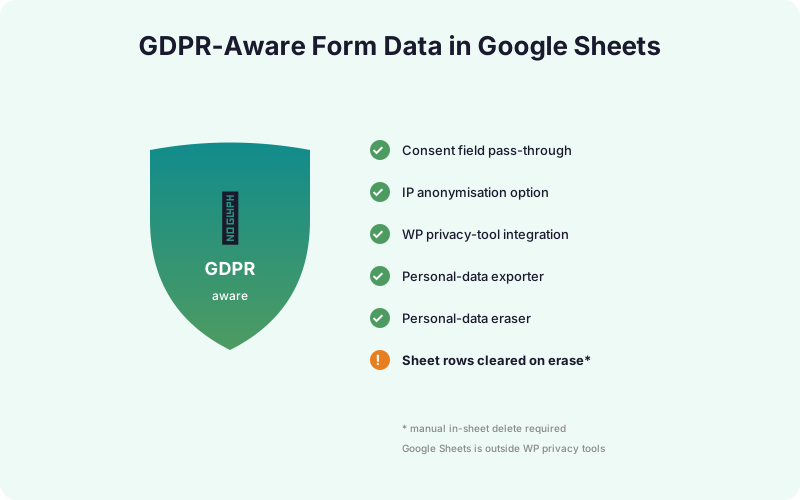
SheetLink passes any consent fields you build into the form straight through to your Sheet, with the checkbox state stored as a string. Add a hidden field with the consent version (for example, consent_v3_2026-04) so a later review can match the exact text against the row. That single column has saved more compliance audits than any plugin setting.
Are You Actually Practising Data Minimisation?
Data minimisation is the GDPR principle most teams nod at and most teams quietly fail. Every field on your form is a question worth asking out loud: do we use this, and if so, for what?
Run a quick audit on any lead-gen form. List every field. Next to each, write the team that consumes it and the action it triggers. Phone number with no SDR team to call it is a liability, not data. Job title that nobody segments on is a liability. Even "how did you hear about us?" should justify itself or come off the form.
Three patterns help in practice. First, default to the smallest viable form (name, email, message), and add fields only when a downstream user can name what they will do with them. Second, prefer optional fields over required ones for anything beyond the core task. Third, kill the "company size" and "budget" fields that exist only to make sales reps feel better, they tank conversion and they create a retention obligation you do not need.
Less data in the Sheet means less to protect, less to export on subject access, and less to erase on request. Minimisation pays off three times.
What Do The Built-In WordPress Privacy Tools Actually Do?
WordPress ships native privacy tooling at Tools > Export Personal Data and Tools > Erase Personal Data. They are not magic. They are filter hooks (wp_privacy_personal_data_exporters and wp_privacy_personal_data_erasers) that plugins must register against. If a plugin does not register, its data is invisible to those screens.
SheetLink registers both an exporter and an eraser for the WordPress-side records it controls: form submission logs, retry queue entries (see retry queue troubleshooting), consent metadata, and the local analytics cache. When a user invokes their right of access under Article 15 or right to erasure under Article 17, the WordPress flow walks every registered exporter or eraser and produces a single ZIP or confirmation page.
The flow is admin-mediated. A user emails you, you create a request in the WordPress admin keyed on their email, the user confirms by clicking a verification link, and you then click Send export or Erase data. The 30-day clock under Article 12(3) starts when you receive the original request, not when you click the button. Build a ticket process around it, do not rely on memory.
How Do You Close The Google Sheets-Side Gap?
Here is the gap that catches teams. WordPress privacy tools cannot reach into your Google Sheet. They clear WordPress-side records on erasure, but every row already written to Sheets stays exactly where it is until somebody removes it. Most small-business GDPR failures we see come from this single oversight.
The fix is a manual sheet erasure pattern bound to your erasure workflow. Add a custom menu item in the Sheet via Apps Script that prompts for an email address, scans the sheet for matching rows, and replaces personal-data cells with [redacted] while preserving non-personal columns like order totals or campaign names. A working skeleton:
function eraseByEmail() { const ui = SpreadsheetApp.getUi(); const email = ui.prompt('Email to erase').getResponseText().toLowerCase(); const sh = SpreadsheetApp.getActive().getSheetByName('Submissions'); const rows = sh.getDataRange().getValues(); const piiCols = [0, 1, 2, 4, 7]; for (let i = 1; i < rows.length; i++) { if (String(rows[i][1]).toLowerCase() === email) { piiCols.forEach(c => sh.getRange(i + 1, c + 1).setValue('[redacted]')); } } }
Redaction beats deletion because it preserves the row for accounting and audit purposes while killing the personal data. The full Apps Script setup guide walks through binding the function to a menu item and locking access to admin-only.
How Do You Handle A Subject Access Request?
Article 15 gives every data subject the right to ask what you hold on them, why, and who you share it with. Article 12(3) gives you one month to respond, extendable by two months for complex requests with a written explanation. Most SARs are simple, but the format trips teams up.
The minimum response includes: every personal data field you hold (name, email, phone, IP, message contents, consent record), the purposes of processing, the categories of recipients (Google Workspace, your CRM, any enrichment tools), the retention period or the criteria used to set it, and the user's other rights (rectification, erasure, portability, complaint to a supervisory authority).
Provide it in a structured, commonly used, machine-readable format. CSV or JSON is the standard. The WordPress export tool produces an HTML ZIP, which is acceptable, but for SAR responses including Sheet data, append a CSV row export from the Sheet itself. A typical flow looks like this:
- Receive the SAR by email and timestamp it.
- Verify the requester's identity through the email confirmation flow.
- Run the WordPress export, plus a Sheet-side CSV filter on their email.
- Bundle everything into a single archive and send via a secure link.
- Log the response date in your Article 30 register.
The 30-day clock is firm. Build the muscle so you can hit it without scrambling.
Why Should You Anonymise IP Addresses At Capture?
IP addresses are personal data under GDPR. The CJEU confirmed this for dynamic IPs in Breyer v Germany in 2016, and supervisory authorities have treated full IP storage as personal-data processing ever since. If your lawful basis does not specifically cover IPs, do not store them in full.
SheetLink's enrichment captures the submitter's IP by default because it powers fraud checks, geographic analytics, and the duplicate-detection window. If you do not need the precision, mask the last octet under Settings > Privacy > Anonymise IP. The masked form (203.0.113.42 becomes 203.0.113.0) is enough for country-level and ISP-level analysis but not enough to uniquely identify a household.
The same setting also controls how IPs land in the local SheetLink analytics cache, the retry queue, and any sheet column you have mapped to {{submission.ip}}. Turn it on once and every downstream consumer gets the masked form. If you later need full IPs for fraud investigation on a specific submission, the audit log still captures the original under a separate, access-restricted table that auto-purges after 30 days.
The default we recommend: mask in production, enable full capture only on forms with documented fraud risk, and audit the setting quarterly.
Which Processors Need A Data Processing Agreement?
Article 28 requires a written contract between you (controller) and every processor that handles personal data on your behalf. For a typical WordPress-to-Sheets stack, that means at least three DPAs sitting in your records.
| Processor | Where to sign | What it covers |
|---|---|---|
| Google Workspace | Workspace Admin Console > Account > Legal and compliance | Sheets, Drive, Gmail, Apps Script storage |
| SheetLink Forms | sheetlinkwp.com/privacy or commercial DPA on request | License server, lead-scoring API, telemetry |
| Zapier or Make (if used) | Account settings > Legal | Webhook payload routing |
| Hosting provider | Provider terms (often auto-signed) | WordPress database, server logs |
| CRM (HubSpot, Salesforce) | Account admin > Legal | Contact records, activity logs |
Article 30 then asks you to keep a Record of Processing Activities listing every processor, the categories of data shared, the legal basis for the transfer, and the retention period. A simple spreadsheet works. The point is that an auditor can ask for it on a Tuesday and you can produce it on the Wednesday. Add new processors to the register the same day you sign their DPA, never "later this week."
What Do Schrems II And SCCs Mean For Your Sheet?
Google stores Workspace data in a global network of data centres, including US locations. After the CJEU's Schrems II ruling in 2020 invalidated Privacy Shield, transfers of EU personal data to the US now require Standard Contractual Clauses plus a Transfer Impact Assessment that documents supplementary technical measures.
Google ships SCCs as part of the Workspace DPA, and the EU-US Data Privacy Framework adopted in July 2023 provides a separate legal basis for organisations on the certified list. Either gets you across the line, but you need to know which one you are relying on and have it written down. Personal Google accounts do not include SCCs, which is why business data should never sit in a personal Drive.
If your customer base is exclusively EU and your DPO has flagged transfer risk, Google Workspace offers Data Regions as an Enterprise feature. You can pin Sheets data to EU-only data centres for primary storage, though backups and processing may still touch other regions. Document whichever option you pick in your Article 30 register and your privacy notice.
For the rare case where transfer risk is unacceptable, the alternative is a self-hosted store. SheetLink can write to a self-hosted database via the AI Analytics add-on as a secondary destination, keeping Sheets as a read-only mirror for the team that needs spreadsheets.
What About Health, Biometric, Or Payment Data?
Article 9 designates a set of "special categories" of personal data: health, biometric, racial or ethnic origin, political opinions, religious beliefs, trade union membership, sex life, and genetic data. Processing them requires a higher bar, usually explicit consent under Article 9(2)(a) plus one of the standard Article 6 bases plus, in many cases, a Data Protection Impact Assessment.
The practical answer for a Sheet-based stack is short: do not. SheetLink does not have a HIPAA Business Associate Agreement, Google Workspace's standard tier does not either, and a default Sheet has none of the access controls a compliant health stack needs. Routing patient intake forms or therapy notes through Sheets is a regulator headline waiting to happen.
Payment card data sits in PCI-DSS territory rather than GDPR special categories, but the answer is the same. Use Stripe, Adyen, or another PCI-DSS-scoped processor and store only metadata (last four digits, transaction ID, amount) in your Sheet. The full PAN should never touch your form.
If you genuinely need to capture special-category data on a WordPress form, the right path is a dedicated, scoped platform with a signed BAA or equivalent, not Sheets with extra encryption. Use SheetLink for everything else and route the special-category flow elsewhere.
Frequently Asked Questions
Should I use a personal Google account or Google Workspace for form data?
Workspace, every time. Personal Google accounts do not include the standard Data Processing Addendum, the Standard Contractual Clauses for international transfers, or the audit-ready admin controls Workspace ships. For any business handling EU or UK customer data, a Workspace Business or Enterprise tier is the minimum baseline, and the cost is trivial against a single supervisory-authority enquiry.
How do EU and UK data transfers work post-Brexit?
The UK GDPR and EU GDPR are now separate but largely aligned. The UK has an adequacy decision from the EU, so EU-to-UK transfers flow freely. UK-to-US transfers need either the UK Extension to the EU-US Data Privacy Framework or the UK International Data Transfer Agreement. Google Workspace covers both. Document which mechanism you rely on in your Article 30 register.
Can I store health or payment data in Google Sheets?
No, not without specific compliance scope you almost certainly do not have. Health data needs HIPAA BAA coverage and Article 9 explicit consent. Cardholder data needs PCI-DSS Level 1 or 2 controls. SheetLink does not carry either certification, and a default Sheet does not either. Use Stripe for cards and a BAA-covered platform for health intake.
How long should I retain form submission data?
Long enough to fulfil the original purpose, no longer. For pure contact enquiries, 6 to 12 months after last contact is typical. For order data, the lower of 7 years (tax) and your sector retention rules. Document the period in your privacy notice and run an automated cleanup pass quarterly. Storage limitation under Article 5(1)(e) is the principle, not a fixed number.
What do I do if there is a data breach involving the Sheet?
Article 33 requires notification to your supervisory authority within 72 hours of becoming aware, where the breach is likely to result in risk to data subjects. Article 34 adds direct user notification for high-risk breaches. Have an incident playbook ready before you need it: who calls the lawyer, who pulls the access logs, who drafts the notice, and who is the press contact.
Am I a controller or a processor in this setup?
If you decide why and how the personal data is processed, you are the controller. The WordPress site owner collecting form data is virtually always the controller. Google Workspace, SheetLink Forms, your CRM, and your hosting provider are processors acting on your instructions. The DPA chain reflects that, with you signing controller-to-processor agreements with each.
Can SheetLink Forms sign a custom Data Processing Agreement?
The standard SheetLink DPA at sheetlinkwp.com/privacy covers most lifetime-licence customers. For agency or enterprise scenarios that need custom liability terms, sub-processor lists, or specific audit clauses, contact us through the address on the privacy page. See the lifetime pricing for tier details, the agency tier includes priority DPA review.
How does cross-border WordPress hosting affect compliance?
Your hosting location is itself a transfer point. A US-hosted WordPress site collecting EU personal data is doing an international transfer the moment the form posts to the server. EU customers should pick EU-hosted WordPress (or at minimum, hosting providers offering SCCs). Document the host in your Article 30 register the same way you document Google Workspace.
Ship GDPR-aware form sync today
SheetLink Forms ships IP anonymisation, WordPress privacy tool integration, and consent field pass-through in the core plugin. See lifetime pricing for the agency tier with priority DPA review.