
How to Deduplicate WordPress Form Leads in Google Sheets Automatically
Duplicate submissions skew your conversion math and waste sales rep time. Here is how to detect, prevent, and clean duplicate leads in Google Sheets without breaking legitimate repeat customers.
In This Guide
- What Do Duplicate Leads Actually Cost You?
- Why Do Duplicate Submissions Happen in the First Place?
- Which Deduplication Strategy Should You Pick?
- How Long Should Your Detection Window Be?
- How Does SheetLink's Built-In Duplicate Detection Work?
- When Should You Use Fuzzy Matching Instead of Exact Email?
- Can You Do Deduplication With Just Sheets Formulas?
- Should You Auto-Delete Duplicates With Apps Script?
- How Do You Dedup Across Multiple Forms or Sites?
- Is Deduplication Required for GDPR, and When Should You Skip It?
- Frequently Asked Questions
What Do Duplicate Leads Actually Cost You?
Duplicate leads are not just a tidy-data problem. They corrupt the three numbers your team trusts most: total leads, cost per lead, and conversion rate. If a single person submits the same form twice, your reported conversion rate doubles on paper, but your real pipeline does not move.
The waste compounds in three places. First, sales reps call the same person twice, which is the kind of thing that gets your domain marked as spam by an annoyed prospect. Second, your ad platforms optimize against inflated conversion counts, so your bid strategy drifts toward the wrong audience. Third, your CRM enrichment costs scale with rows, not with unique humans, so duplicates literally show up on the invoice.
One mid-market team we worked with audited a year of form data and found 11.4 percent of rows were exact-email duplicates submitted within 24 hours. That is roughly one in nine leads a rep should never have touched. The fix is not exotic, but it does require a deliberate strategy, not a one-time cleanup.
Why Do Duplicate Submissions Happen in the First Place?
Most duplicates are not malicious. They come from boring, predictable user behavior, and once you can name the cause, you can pick the right defense. Blocking everything looks tidy until you realize you blocked your best customer rebooking a demo.
- Double-click on submit. Slow networks plus impatient users equals two POSTs in 800 ms. This is the most common cause and the easiest to prevent at the form layer with a disabled-button state.
- Page refresh after submit. If your thank-you page is the same URL as the form, hitting refresh resubmits the form data. Always redirect to a distinct success URL.
- Multi-channel campaigns. The same person clicks your Google ad on Monday, your retargeting ad on Wednesday, and your newsletter link on Friday. Three rows, one human, three different UTM tags.
- Bot traffic. Headless scrapers and form-spam tools hit forms in bursts. Honeypot fields and rate limits help, but some still slip through.
- Intentional resubmits. The user typed the wrong phone number the first time. This one you actually want to keep, just with overwrite semantics, not flag-and-ignore.
Notice how the right response differs for each cause. That is why a single global dedup rule almost always misclassifies something.
Which Deduplication Strategy Should You Pick?
There are three workable patterns for handling duplicates in a Google Sheet. Each has a clear failure mode, so pick based on how your sales team actually consumes the data, not on what looks cleanest in a spreadsheet.
Strategy 1: Flag and keep
Add a duplicate_of column. When a new row matches an existing email within your detection window, write the row anyway and populate duplicate_of with the original row number. Pros: zero data loss, full audit trail, easy to filter out. Cons: your row count keeps growing, and reps must remember to filter.
Strategy 2: Overwrite in place
When a duplicate arrives, update the existing row with the new values instead of appending. Pros: one row per person, always current. Cons: you lose the history of what changed, and concurrent submissions can race. Best for forms where the latest answer is the only one that matters, like a profile-update form.
Strategy 3: Separate dedup tab
Keep the raw Submissions tab append-only and write a clean Unique Leads tab driven by a QUERY or UNIQUE formula. Pros: full raw history plus a sales-ready view. Cons: two tabs to maintain, formula tab can break with schema changes.
For most teams, strategy 3 wins. It separates the system of record from the working view, and that distinction tends to age well.
How Long Should Your Detection Window Be?
The detection window is the time after the first submission during which a matching submission counts as a duplicate. Pick it wrong and you either let through obvious duplicates or you suppress legitimate repeat interest. There is no universal right answer, but there are four sane defaults.
| Window | Use case |
| 5 minutes | Form bounces, double-clicks, page refresh. Pure noise. Safe to suppress silently. |
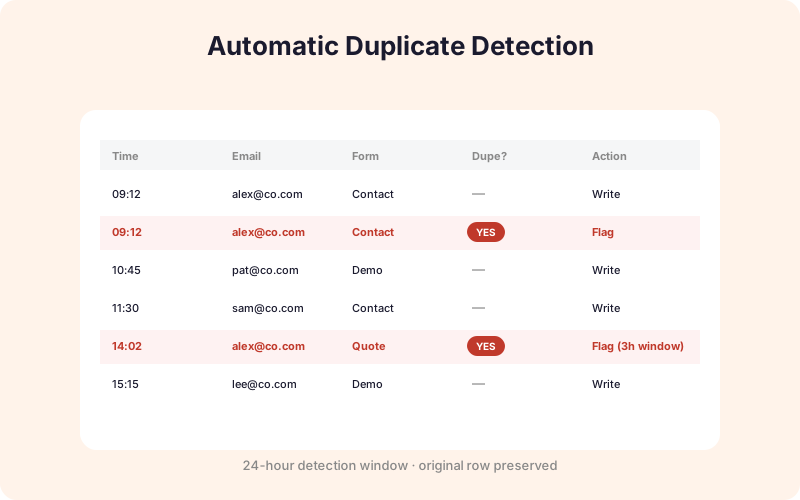
| 24 hours | Single-session campaign behavior. Same person retrying, comparison shopping, filling form on phone then desktop. SheetLink's default. |
| 7 days | Genuinely interested lead nurturing. Treat second submission as engagement signal, not duplicate. |
| 30 days | Returning lead. Almost always worth a fresh outreach, not a dedup. |
A practical rule: anything inside 24 hours is probably the same intent, anything past 7 days is probably a fresh signal, and the gray zone in between depends on your sales cycle. B2B teams with 60-day cycles can stretch the window to 7 days. Ecommerce teams often shrink it to 1 hour because someone resubmitting a coupon form 3 hours later is a different decision moment.
How Does SheetLink's Built-In Duplicate Detection Work?
SheetLink Forms ships with duplicate detection on every submission. It does not require the AI Analytics add-on for the basic case. The mechanism is intentionally simple so it stays fast and predictable.
On submit, SheetLink takes the email field, lowercases it, trims whitespace, and computes a SHA-256 hash. It then checks the analytics log for a matching hash within the configured window. The window is controlled by the sheetlink_analytics_dup_window WordPress option, in seconds, and defaults to 86400, which is 24 hours.
If a match is found, the submission is still written to your sheet, but it is tagged as a duplicate in the analytics dashboard so your reported conversion rate is not inflated. This is the flag-and-keep pattern from the previous section, and it preserves the audit trail without making sales reps reconcile two systems.
To change the window, you can drop a one-liner in your theme's functions.php:
update_option( 'sheetlink_analytics_dup_window', 3600 );
That sets the window to 1 hour. Set it to 0 to disable detection entirely if you have a use case where every submission is a fresh event, like a daily check-in form. Hashing the email instead of storing it raw also keeps the analytics log GDPR-friendlier, since the hash is one-way.
When Should You Use Fuzzy Matching Instead of Exact Email?
Exact email matching catches the obvious cases, but it misses the sneaky ones. The AI Analytics add-on ships a duplicate scan that looks beyond the email field, which is useful when the same human is using different inboxes on purpose or by accident.
The fuzzy scan checks four additional signals, each scored independently and combined into a duplicate-confidence score:
- Same phone number. Strong signal. Phone numbers change less often than emails and are rarely shared.
- Similar names. Levenshtein distance on first plus last. Catches "Jon Smith" versus "John Smith" and the always-fun "Jonathan Smith" follow-up.
- Same IP address within window. Useful but noisy, since office NATs and VPNs share IPs across many people. Treat as supporting evidence, not proof.
- Message-content similarity. If two submissions paste the same paragraph into the message field, that is almost certainly the same person retrying.
Confidence above 0.85 is a near-certain duplicate. Between 0.6 and 0.85 the dashboard surfaces the pair for human review. Below 0.6, the system leaves them alone. The point is not to auto-delete anything, it is to give your CRM admin a ranked list of "probably the same person" pairs to merge during their weekly hygiene pass. See the Analytics dashboard docs for the full scoring model.
Can You Do Deduplication With Just Sheets Formulas?
Yes, and for small volumes it is the right call. If you are getting under 200 submissions a month, a formula-driven dedup tab is simpler than any plugin setting and easier to hand off to a non-technical operator. Here are the four formulas that cover 95 percent of cases.
Count duplicates per email
=COUNTIF(B:B, B2) in a helper column flags how many times each email appears. Anything greater than 1 is a duplicate. Filter the column for >1 to see your dupes.
Get a unique-emails list
=UNIQUE(B2:B) in a fresh tab returns one row per distinct email. Combine with ARRAYFORMULA for joining other columns.
Build a clean leads tab with QUERY
=QUERY(Submissions!A:H, "SELECT A, MIN(B), MAX(C) WHERE B IS NOT NULL GROUP BY A", 1) collapses to one row per email, taking the earliest first-seen and latest last-seen timestamp. This is the workhorse for a sales-ready unique-leads view.
Conditional formatting for visual dedup
Format > Conditional formatting > Custom formula =COUNTIF($B$2:$B2, $B2)>1. Highlights the second-and-later occurrence of each email in red, leaving the original clean. Handy for manual review tabs.
The downside of pure formulas is that they recompute on every change, which gets slow past a few thousand rows. If your sheet feels sluggish, that is your cue to move to plugin-side dedup.
Should You Auto-Delete Duplicates With Apps Script?
Probably not, but there are narrow cases where it is the right tool. Apps Script can run on a time trigger and physically remove duplicate rows, which is satisfying to watch and dangerous to trust. The risk is that any false positive is now permanently gone, with no audit trail.
If you still want it, here is a minimal version that keeps the earliest occurrence per email and deletes later ones. Run it manually first, on a copy of the sheet, before scheduling.
function dedupeByEmail() { const sh = SpreadsheetApp.getActive().getSheetByName('Submissions'); const data = sh.getDataRange().getValues(); const seen = new Set(); for (let i = data.length - 1; i >= 1; i--) { const email = String(data[i][1]).toLowerCase().trim(); if (seen.has(email)) { sh.deleteRow(i + 1); } else { seen.add(email); } } }
Two safety rules if you go this route. First, never run destructive scripts without a daily backup of the sheet, which you can automate with a second script that copies the sheet to a dated archive. Second, prefer moving rows to an Archive_Duplicates tab over actually deleting them. You will thank yourself the first time a sales rep insists they saw a lead that the script ate.
How Do You Dedup Across Multiple Forms or Sites?
Single-form dedup is the easy case. The harder, more valuable case is when the same person fills three different forms - a contact form, a webinar signup, and a pricing-page lead magnet - and you want one row per human in a master Contacts tab.
The pattern is a fan-in: each form writes to its own raw tab, and a single Contacts tab is built by QUERY-ing across all three with a UNION-like construction. Something like =QUERY({Contact!A:D; Webinar!A:D; Pricing!A:D}, "SELECT Col1, MIN(Col2), MAX(Col3) WHERE Col1 IS NOT NULL GROUP BY Col1", 0) collapses by email across all three sources. The first-seen timestamp tells you the original entry point, which is gold for attribution.
For agencies running the plugin across many client sites, cross-site dedup is harder because each WordPress install is a separate database. The Multi-Node Routing add-on lets a central node receive submissions from many client sites and write to a shared agency sheet, where you can dedup once across the whole portfolio. Pair it with the Multi-CRM Routing add-on if you want the deduped record pushed onward to HubSpot or Salesforce in a single create-or-update call rather than three separate creates.
Is Deduplication Required for GDPR, and When Should You Skip It?
Deduplication is not legally required by GDPR, but it does help you defend a data-minimization posture. Storing one record per person instead of seven means less personal data sitting in your sheet, which means a smaller breach surface and an easier subject-access request when someone invokes their right to erasure. See your own privacy policy for what you have promised users.
That said, dedup is not always the right move. There are three situations where aggressive dedup actively hurts you:
- Legitimately repeat customers. An ecommerce buyer placing a fourth order is not a duplicate, they are your best customer. Dedup on a customer-creation event, not on every order.
- B2B colleagues sharing an email. Smaller companies often use
info@company.comas the contact for everyone. Three submissions from that address may be three different humans. Use phone or name as a secondary signal. - Intentional A/B test resubmits. If you are running a test where users complete a flow twice on purpose, dedup will silently destroy your results. Tag those submissions with a test ID and exclude them from the dedup pass.
The safe default is to flag, not delete, and to give a human the final call on anything below 0.85 confidence. Fast computers should suggest. Slow humans should decide.
Frequently Asked Questions
Is it safe to auto-delete duplicate leads on a schedule?
Generally no. Auto-delete has no audit trail, and a single false positive is gone forever. Prefer flagging duplicates with a column or moving them to an archive tab. If you must delete, run on a copy first and keep a daily backup of the sheet.
Can SheetLink dedup across multiple forms on the same site?
Yes. Each form writes to its own tab, then a master Contacts tab uses a QUERY across all source tabs grouped by email. The AI Analytics add-on does this fan-in automatically and adds fuzzy matching across forms, so a typo in one form does not create a phantom contact.
How does cross-site deduplication work for agencies?
Each WordPress site has its own database, so cross-site dedup needs a central collection point. The Multi-Node Routing add-on forwards submissions from many client sites to one central sheet, where you dedup once across the whole portfolio rather than per site.
Does GDPR require me to deduplicate leads?
No, GDPR does not explicitly require deduplication. It does require data minimization, and dedup helps you honor that principle by storing fewer records per person. It also makes erasure requests simpler, since you delete one row instead of hunting down seven scattered duplicates.
How accurate is fuzzy matching beyond exact email?
The AI Analytics add-on combines email, phone, name similarity, IP, and message content into a confidence score. Above 0.85 is near-certain. Between 0.6 and 0.85 the dashboard surfaces the pair for human review rather than auto-merging, which keeps false positives off your record.
What about B2B teams that share a single info@company.com inbox?
This is the classic false-positive case for email-only dedup. Use a secondary signal, usually phone or full name, before treating two submissions to a shared inbox as duplicates. Or exempt known shared-inbox patterns like info@, sales@, and contact@ from your dedup rule entirely.
Should I dedup in Google Sheets or wait and dedup in my CRM?
Both, but for different reasons. Sheet-level dedup keeps your reported conversion math accurate. CRM-level dedup keeps your sales reps from making duplicate calls. The Multi-CRM Routing add-on uses create-or-update semantics so the CRM never sees the same person twice, even if your sheet does.
How do I export only unique leads from my submissions sheet?
Build an Unique Leads tab with =QUERY(Submissions!A:H, "SELECT A, MIN(B), MAX(C) GROUP BY A", 1), then File > Download from that tab. You get one row per email with first-seen and last-seen timestamps, which is what most CRM importers actually want anyway.
Can I see duplicate stats in the SheetLink analytics dashboard?
Yes. The local analytics dashboard shows total submissions and unique submissions side by side, so you can see your duplicate rate at a glance. The AI Analytics add-on adds a duplicate-confidence histogram and a ranked list of suspected pairs for review.
Stop counting the same lead twice
The AI Analytics add-on adds fuzzy duplicate detection, confidence scoring, and a review queue on top of SheetLink's built-in 24-hour dedup window. See lifetime pricing on the /pricing page.