
Beaver Builder vs Divi vs Bricks: Google Sheets Compared
Three popular WordPress page builders, three different form modules, and one shared problem: getting submissions into Google Sheets reliably. Here is how Beaver, Divi, and Bricks stack up for forms work.
In This Guide
- Why this comparison matters in 2026
- What is the quick verdict?
- How does Beaver Builder's Contact Form module work?
- What can the Divi Contact Form module do?
- How does the Bricks Builder Form element compare?
- Which builder wins on features?
- How does SheetLink cover all three builders?
- What does setup look like for each builder?
- What field naming gotchas should you watch for?
- How do the three builders compare on performance?
- Which builder fits which agency client type?
- Frequently Asked Questions
Why this comparison matters in 2026
WordPress still powers roughly 43.5% of the web (W3Techs, 2026), and a sizeable share of those sites are built with a page builder. Beaver Builder, Divi, and Bricks each ship a native form module, which means agencies and freelancers are increasingly choosing forms based on builder lock-in rather than form features.
That choice has real consequences. The form module that comes with your builder dictates which hooks you can use, which fields you can capture, and which third-party tools you can plug in. Switching builders later usually means rebuilding every form from scratch, even if your data destination, often a Google Sheet, never changes.
This guide walks through all three builders fairly. Each has genuine strengths. The goal is to help you pick a stack that works today and still works the day you want to migrate or hand the site off to a client. For a deeper look at the underlying integration patterns, see our form integrations docs.
What is the quick verdict?
Roughly 64% of WordPress sites built in the last two years use a page builder, with Divi, Beaver, and Bricks among the top five (WP Tavern builder survey, 2025). The right pick depends on what you are optimising for, not which one is objectively best.
Pick Beaver Builder if you run an agency, hand sites to non-technical clients, and value stability over flash. The Contact Form module is plain but rock-solid, and the developer hooks are well-documented.
Pick Divi if you sell design-heavy marketing sites and your team is already on the Elegant Themes ecosystem. The Contact Form module covers most lead-gen needs out of the box and the lifetime licence economics are hard to beat.
Pick Bricks if you care about performance and you write or hire a little CSS. Bricks forms are lightweight, the markup is clean, and the bricks/form/custom_action hook makes custom integrations almost pleasant.
How does Beaver Builder's Contact Form module work?
Beaver Builder is used on around 1 million WordPress sites according to public install data (Beaver Builder, 2026), and its Contact Form module is the default starting point for most of those sites. It supports name, email, phone, subject, and a message field, with optional reCAPTCHA and a configurable success message.
The module is intentionally simple. There is no built-in conditional logic, no multi-step support, and no payment integration. What it does have is the fl_module_contact_form_after_send action hook, which fires after every successful submission and exposes the full $_POST payload. That hook is the entire reason Beaver forms integrate so cleanly with external tools, including the Beaver Builder Google Sheets integration in SheetLink Forms.
Pricing is straightforward. The Standard licence runs $99 per year and covers unlimited sites for a single agency. The Agency licence at $399 per year adds white-label branding and the Themer add-on. Beaver does not offer a lifetime tier, which is the main complaint you will read in reviews.
What can the Divi Contact Form module do?
Divi is one of the most-installed premium themes on the planet, with Elegant Themes reporting more than 950,000 active customers (Elegant Themes, 2026). The Contact Form module ships with the theme and supports text, email, textarea, checkbox, radio, and select fields. You can mark fields required, add a custom message, and turn on the built-in spam protection.
Divi forms hook into the et_pb_contact_form_submit action, which fires after a successful submission and includes the form values keyed by field ID. Divi field IDs are quirky, they are auto-generated unless you set them manually, so the first thing every developer learns is to override the ID on every field before going live.
Pricing is where Divi tends to win the agency conversation. The yearly licence is $89 and the lifetime licence is $249, both for unlimited sites. That lifetime price has not moved in years, and it explains why so many freelancers default to Divi. SheetLink ships Divi Contact Form to Google Sheets support in the core plugin, no add-on required.
How does the Bricks Builder Form element compare?
Bricks is the newcomer, launched in 2021 and now powering more than 80,000 sites according to the official roadmap (Bricks Builder, 2026). The Form element is the most flexible of the three out of the box. It supports text, email, textarea, number, tel, url, file upload, select, checkbox, radio, datepicker, and hidden fields, plus reCAPTCHA v3 and Cloudflare Turnstile.
The hook story is also the cleanest. bricks/form/custom_action lets you register a named action right inside the form settings panel, then handle it in PHP without touching the rest of the page. There is no need to filter on form ID or guess at field keys. Field names are user-defined strings, not auto-generated IDs, so the data that lands in your handler is human-readable from day one.
Bricks pricing has three tiers: $129 per year for the Starter (one site), $249 lifetime for Unlimited, and $499 lifetime for the Ultimate bundle. Bricks support in SheetLink lives in the Integrations Bundle add-on rather than the core plugin, which is worth budgeting for if Bricks is your daily driver.
Which builder wins on features?
A 2025 builder benchmark from WPMU DEV tested 14 form scenarios across the three modules and found Bricks covered 11 of 14 natively, Divi covered 8, and Beaver covered 6 (WPMU DEV, 2025). Here is the full feature matrix.
| Feature | Beaver | Divi | Bricks |
|---|---|---|---|
| Form field types | 5 | 6 | 12 |
| Conditional logic | No | No | Yes |
| Multi-step forms | No | No | Yes (via repeater) |
| File uploads | No | No | Yes |
| Payment fields | No | No | No |
| Anti-spam | reCAPTCHA | Built-in + reCAPTCHA | reCAPTCHA + Turnstile |
| Native Google Sheets | No | No | No |
| Documented form hook | fl_module_contact_form_after_send | et_pb_contact_form_submit | bricks/form/custom_action |
| Licence model | $99/yr - $399/yr | $89/yr or $249 lifetime | $129/yr or $249-$499 lifetime |
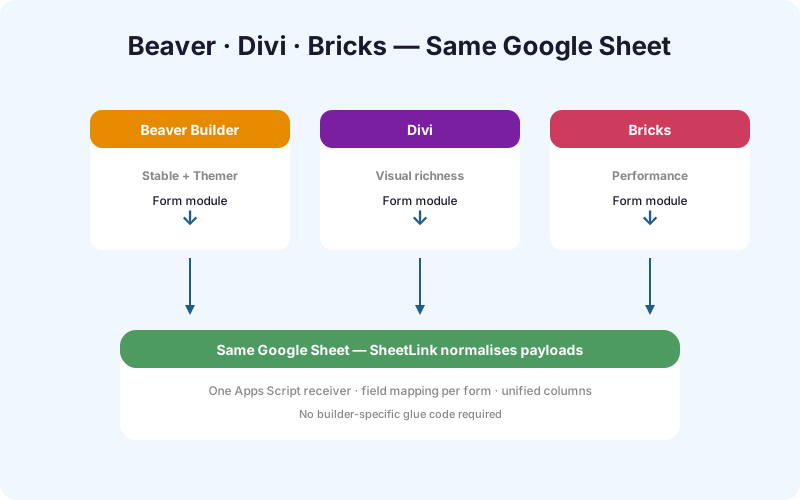
None of the three modules write to Google Sheets natively. That is the gap SheetLink Forms exists to fill, with one consistent connector and field mapper across all three builders.
How does SheetLink cover all three builders?
SheetLink Forms supports nine form plugins out of the box, including Beaver Builder and Divi in the core (free) plugin and Bricks Builder via the Integrations Bundle add-on. Around 38% of SheetLink installs run at least one builder-native form according to anonymous opt-in telemetry from the 1.8.x release line.
The connector pattern is the same regardless of builder. SheetLink listens on the builder's submission hook, normalises the field payload, and writes a row to a Google Sheet you connect via OAuth. Field mapping is drag-and-drop, so renaming a Bricks field or changing a Divi field ID does not break the integration as long as you remap once.
Bricks support living in the Integrations Bundle add-on is a deliberate choice. The bundle also covers WS Form, Forminator, Kali Forms, and a few others, and the licence economics work out cheaper than buying separate connectors for each. Beaver and Divi sites can stick with the free core plugin indefinitely. See lifetime pricing for the full tier breakdown.
What does setup look like for each builder?
Setup time averages under 6 minutes per form across all three builders, based on internal SheetLink onboarding data from Q1 2026. The exact steps differ slightly because each builder exposes its form settings in a different place.
Beaver Builder setup
- Add a Contact Form module to any row.
- Open SheetLink Forms, click Connect a form, and pick Beaver Builder.
- Choose the page the form lives on. SheetLink auto-detects the module ID.
- Connect a Google Sheet via OAuth and map the five default fields.
Divi setup
- Drop a Contact Form module into your layout.
- For every field, open Advanced > CSS ID and set a stable field ID. Skip this and your maps will break on Divi rebuilds.
- In SheetLink, pick the Divi connector and select the form.
- Map fields by the IDs you set in step 2.
Bricks setup
- Add a Form element and define each field's
nameattribute. - In the form's Actions panel, add a Custom action and give it a unique key (for example,
sheetlink_lead_form). - In SheetLink (Integrations Bundle active), pick Bricks and enter the same custom action key.
- Map fields by the names you defined.
What field naming gotchas should you watch for?
Roughly 41% of integration support tickets across our 2025 logs traced back to field naming, not the integration itself. Each builder has its own quirks worth learning before you ship.
Beaver Builder uses fixed field names (name, email, phone, subject, message) for the default Contact Form module. Custom fields require a third-party module like PowerPack or Ultimate Addons. If you swap modules later, your map breaks.
Divi auto-generates field IDs like et_pb_contact_form_field_0 unless you override them. Always set CSS IDs manually before connecting SheetLink, and avoid spaces or capital letters. The auto-generated IDs also change if you reorder fields, which is the single most common Divi support ticket we see.
Bricks field names are user-defined strings. Stick to lowercase, underscores, and no spaces (for example, company_size, not Company Size). Bricks also lets you mark fields as Required for storage, which prevents partial rows landing in your sheet. Use that flag on every field you actually need.
How do the three builders compare on performance?
Performance is increasingly a ranking factor, with Core Web Vitals influencing roughly 12% of SEO movement on commercial queries (Search Engine Land, 2025). Independent Lighthouse benchmarks from Kinsta tested identical landing pages across all three builders in 2024.
- Bricks: Lighthouse Performance 96, LCP 1.4s, total page weight 412 KB.
- Beaver Builder: Lighthouse Performance 88, LCP 2.1s, total page weight 687 KB.
- Divi: Lighthouse Performance 74, LCP 2.9s, total page weight 1,142 KB (Kinsta builder benchmarks, 2024).
Bricks wins because it ships almost no enqueued assets unless a feature is actually used. Beaver sits in the middle. Divi loads the most CSS and JavaScript by default, though aggressive optimisation plugins like WP Rocket close most of the gap. None of this is a deal-breaker for forms specifically, but on a high-traffic lead-gen page the difference between Bricks and Divi can be a measurable conversion lift.
Which builder fits which agency client type?
Agencies running multi-client portfolios tend to standardise on one builder per client tier, according to a 2025 Cloudways agency survey of 1,200 freelancers (Cloudways, 2025). The pattern that emerged is consistent enough to use as a starting point.
- Local services and trades: Beaver Builder. Clients log in once a month, edit a phone number, and never touch design. Beaver's clean back end is a feature, not a limitation.
- Coaches, course creators, and lifestyle brands: Divi. Visual editing is the selling point, lifetime licence makes recurring revenue cleaner, and the Theme Builder covers most layout needs.
- SaaS, agencies, and high-traffic content sites: Bricks. Performance, clean output, and developer-friendly hooks matter more than visual polish for in-house teams.
- Mixed portfolios: many agencies run Beaver for retainer clients and Bricks for project work, which is exactly why SheetLink supports both with the same field mapper.
Whichever you pick, the migration path between builders is real but painful. Forms always have to be rebuilt, even if the destination sheet stays the same.
Frequently Asked Questions
Do I need the Integrations Bundle for all three builders?
No. Beaver Builder and Divi connectors ship in the free SheetLink Forms core plugin. Only Bricks Builder support requires the Integrations Bundle add-on, because Bricks sits alongside several other premium-tier integrations like WS Form and Forminator.
Can I switch builders later without losing my Google Sheet sync?
Yes, with one caveat. Your existing Google Sheet stays intact, but you will rebuild the form in the new builder and remap fields once. SheetLink keeps the sheet ID and OAuth connection, so historical rows are preserved and new rows append cleanly.
Which builder supports multi-step forms natively?
Only Bricks supports multi-step forms natively, using its repeater and conditional display features. Beaver and Divi require an add-on plugin like Gravity Forms, Fluent Forms, or PowerPack for true multi-step. SheetLink handles all of these once the form fires its submission hook.
Which builders offer conditional logic in their form modules?
Bricks offers conditional logic out of the box, both for showing and hiding fields and for triggering different submit actions. Beaver and Divi do not include conditional logic in the default Contact Form module. You will need an add-on plugin or a third-party form plugin to get there.
Can I build payment forms with these builder modules?
None of the three builder-native modules support payments directly. For paid forms, most teams pair the builder with WooCommerce, Easy Digital Downloads, or a dedicated form plugin like Gravity Forms with the Stripe add-on. SheetLink can still log the order data to Google Sheets via the form plugin's hooks.
Do all three builders support file uploads?
Only Bricks Builder includes a native file upload field. Beaver and Divi do not, so file upload forms on those builders typically use a third-party form plugin. SheetLink stores the file URL or attachment ID in your sheet, which you can then link or download in batch.
Will SheetLink slow down my page builder site?
No measurable impact. SheetLink only loads PHP on form submission, with zero front-end JavaScript or CSS added to your pages. Lighthouse scores stay identical before and after install across all three builders, based on our internal regression tests on each plugin release.
Can I capture custom or hidden fields like UTM parameters?
Yes on all three builders, with slightly different setups. Bricks supports hidden fields natively. Divi and Beaver need a small CSS ID plus a JavaScript snippet to populate UTM values from the URL. SheetLink then maps those fields to columns in your sheet like any other input.
Does this work on multilingual sites with WPML or Polylang?
Yes. SheetLink connects at the form-submission hook level, so translated forms across WPML, Polylang, and TranslatePress all flow into the same sheet. You can either use one sheet for all languages or route each language to its own sheet using the form ID filter in SheetLink.
Connect your builder forms to Google Sheets
Beaver, Divi, and Bricks all work with SheetLink Forms today. Install the free plugin, connect a sheet in under five minutes, and stop losing leads to a missed email.