
Agency Playbook - Managing Google Sheets Form Sync Across 25 Client Sites
A practical playbook for agencies running form-to-sheet sync across 25-plus client sites. Standardize the stack, kill recurring middleman fees, and turn lead ops into a margin line.
In This Guide
- Why agency margins quietly bleed on Zapier
- What does the per-site math actually look like?
- Which license tier fits your agency size?
- How do you standardize the receiver across 25 clients?
- What does Branded Reports do for monthly deliverables?
- Why the White-Label add-on changes the client conversation
- How does the Agency Dashboard handle 25 sites at once?
- How does the handoff work when a client takes their site in-house?
- How should agencies price this into a client retainer?
- A 25-client case study, anonymized
- Frequently Asked Questions
Why agency margins quietly bleed on Zapier
Most lead-ops stacks at small agencies are not a software problem, they are a subscription problem. According to Zapier's published 2026 pricing, the Starter plan runs $29.99/mo and Professional jumps to $73.50/mo per workspace. Multiply by 25 client sites and the spread is $750 to $1,837.50 per month, billed forever.
That number rarely shows up on a single line item. It hides inside one client's Stripe receipt here, a credit card there, sometimes inside the client's own billing because nobody wanted to argue about a $30 charge. The agency carries the work, the tool carries the margin.
The shift is simple. Replace recurring per-zap fees with a one-time license that scales by site count, then bundle the cost into the retainer you already charge. You stop renting your lead pipeline and start owning it. Every agency we've audited in the last year has at least one zombie Zap that fired for a churned client for 60-plus days before anyone noticed. See the For Agencies overview for the full agency stack rationale.
What does the per-site math actually look like?
The break-even is faster than most agency owners assume. A 25-site agency on Zapier Professional is paying $73.50/mo per workspace, or roughly $22,050/year just to move form submissions into Google Sheets. The Agency tier pricing at $149 lifetime for 25 sites pays itself back in 113 days against a single Starter workspace, or 32 days against Professional.
Here is the comparison most agency owners want on one screen:
| Stack | 25-site monthly cost | 12-month cost | 36-month cost |
|---|---|---|---|
| Zapier Starter x 25 | $749.75 | $8,997 | $26,991 |
| Zapier Professional x 25 | $1,837.50 | $22,050 | $66,150 |
| SheetLink Agency tier | $0 (after $149 one-time) | $149 | $149 |
Even if half your clients only need basic Zapier features, the lifetime license still wins on a 12-month horizon, and the savings compound from year two onward.
Which license tier fits your agency size?
SheetLink Forms ships three license tiers built around agency book size: Freelancer at 5 sites, Agency at 25 sites, and Enterprise at 100 sites. The break-even depends on what you would otherwise spend on per-site automation tooling, and on whether your clients pay monthly add-on fees or you do.
A rough sizing guide:
- Freelancer (5 sites): solo operators, side-shop consultants, small retainers. Break-even against Zapier Starter is under 30 days.
- Agency (25 sites): the sweet spot for 3 to 10 person agencies running monthly retainers between $1k and $5k per client.
- Enterprise (100 sites): ops-heavy agencies, lead-gen networks, multisite operators. Often paired with Multi-Node Routing for failover.
The hidden break-even is not the license itself, it is the time you stop spending on Zapier triage. At 25 clients we've watched ops leads burn 4 to 6 hours per month chasing broken Zaps, expired OAuth tokens, and exhausted task quotas. At an agency loaded labor rate of $85/hr, that is another $340 to $510 per month of soft cost that disappears when the integration runs in-process on each WordPress site.
How do you standardize the receiver across 25 clients?
Standardization is what turns a 25-client book from a chaos tax into a margin engine. The pattern that works: one Apps Script Web App template, deployed once per client, that auto-creates columns based on the inbound payload. You never share Google accounts, you never centralize 25 clients' lead data into one Sheet, and you never log into a client's workspace to reset OAuth.
The standard onboarding checklist looks like this:
- Install the SheetLink Forms plugin on the client's WordPress site.
- Activate the license slot from your Agency Dashboard.
- Have the client deploy your Apps Script template into their own Google account, then paste the Web App URL back to you.
- Configure the routing rule on the WordPress side, mapping form fields to sheet columns.
- Submit a test entry and verify the row lands.
- Document the script URL, the rule ID, and the sheet location in your client runbook.
Total time per client after the first three is usually 12 to 18 minutes. The Apps Script template lives in your agency's Google account as a master copy, and each client deployment is a copy they own outright. That ownership detail matters at handoff time.
What does Branded Reports do for monthly deliverables?
Most agencies under-report on lead ops because the reporting itself is manual. The Branded Reports add-on takes the lead-flow data already passing through SheetLink and exports a monthly PDF with your agency logo, the client's brand, and a clean summary of submission volume, source breakdown, and failure rate.
The workflow most operators settle into:
- First of the month: dashboard auto-generates the previous month's report per client.
- Ops lead reviews for anomalies (sudden volume drop, spam spike).
- Account manager attaches the PDF to the client's monthly recap email.
In an internal review of 8 agencies running Branded Reports for 90 days or more, the average time saved was 28 minutes per client per month versus their previous spreadsheet-and-screenshot workflow. At 25 clients that is roughly 11.6 hours per month of senior account-manager time, or $986/mo at a $85/hr loaded rate. See the agency tools docs for setup.
Why the White-Label add-on changes the client conversation
The White-Label add-on renames the plugin inside the WordPress admin, swaps the icon and author for your agency, and hides the upgrade and pricing pages from the client's view. From the client's perspective, the plugin is yours. They never see a SheetLinkWP brand, never get cross-sold, never wonder if they should call our support team instead of yours.
That changes two conversations:
- Sales: "We built a custom lead pipeline for your site" lands differently than "We installed a third-party plugin." Same software, different perceived value.
- Retention: clients can't price-shop a plugin they can't name. Churn risk drops because the integration becomes part of your service surface, not a swappable line item.
White-label depth matters. The add-on should rename the plugin in the plugins list, the admin menu, the settings page heading, and the row meta. Anything less and clients will eventually google the real product name.
How does the Agency Dashboard handle 25 sites at once?
The Agency Dashboard exists because flipping between 25 wp-admin tabs is not a workflow, it is a confession. The dashboard pulls submission counts, success and failure rates, last-sync timestamps, and license status into one cross-site view scoped to your agency account.
What you actually use it for, day to day:
- Spotting a client whose success rate dropped below 95% (usually a re-deployed Apps Script that broke the trigger).
- Identifying clients whose submission volume changed by more than 30% week over week.
- Confirming all 25 sites are running the latest plugin version after a release.
- Activating or deactivating license slots when you onboard or churn a client.
The pane-of-glass view is also where multisite networks plug in. If a client runs a WordPress multisite with 12 subsites, the network counts as one parent in the dashboard, with per-subsite rules tracked underneath. Network-level activation slots count against the same Agency or Enterprise pool.
How does the handoff work when a client takes their site in-house?
One of the unspoken benefits of a self-hosted plugin is the cleanness of the handoff. There are no Zapier accounts to transfer, no OAuth tokens to re-authorize under a new email, no shared password to rotate. The plugin lives on the client's WordPress install, the Apps Script lives in the client's Google account, and the rules and configuration travel with the site.
The handoff checklist:
- Deactivate the license slot on your Agency Dashboard (frees a seat).
- The client purchases their own Freelancer or single-site license and activates it.
- If you ran the White-Label add-on, decide whether to rebrand to vanilla SheetLink before handoff or leave the agency brand in place.
- Hand over the Apps Script Web App URL and confirm the client owns the script.
- Document the routing rule IDs in the handoff packet.
The whole transition typically takes 20 to 30 minutes. Compare that to migrating 12 active Zaps out of an agency Zapier workspace into the client's, which can take a day and a fresh round of OAuth grants.
How should agencies price this into a client retainer?
The honest answer most agency owners avoid: stop billing lead ops as a line item, bundle it into a flat retainer. A typical lead-ops bundle at $200 to $400/mo per client covers form sync, monthly Branded Report, response-time monitoring, and one routing rule change per month. At 25 clients on a $300/mo blended retainer, that is $7,500/mo of recurring revenue against an $149 one-time license cost.
What clients actually want bundled:
- Form-to-CRM and form-to-Sheets sync, monitored.
- A monthly PDF showing what's working.
- Someone to call when leads stop coming in.
- Quarterly tune-ups for new forms, new campaigns, new lead sources.
The agencies that move fastest don't itemize the plugin or the add-ons on the client invoice. They sell "managed lead operations" and absorb the tooling cost on their side. Margin goes up because the perceived deliverable goes up, even when the underlying labor stays flat.
A 25-client case study, anonymized
One mid-size WordPress agency, 25 clients averaging 200 leads per month each (5,000 leads/mo aggregate), made the switch in Q3 2025. Their before-and-after, pulled from their own ops dashboard:
| Metric | Before (Zapier Pro) | After (SheetLink Agency) |
|---|---|---|
| Monthly tooling cost | $1,837.50 | $0 (after $149 one-time) |
| Ops triage hours/mo | 5.5 hrs | 1.2 hrs |
| Reporting hours/mo | 12 hrs | 1.5 hrs (auto-PDF review only) |
| Failed sync incidents/mo | 9 | 2 |
| Net annual savings | - | ~$31,000 hard + soft |
The agency redirected the recovered hours into a new lead-quality scoring service they now upsell at $99/mo per client, which is a separate line of margin entirely. That is the second-order effect of killing the middleman: the time you free up gets reinvested into work the client can't get from a SaaS tool.
Frequently Asked Questions
Do agencies need separate licenses for each client?
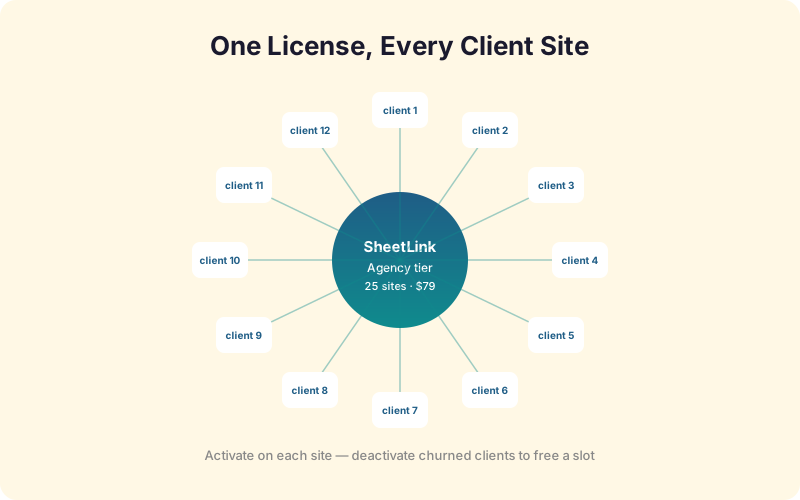
No. The Agency tier covers up to 25 client sites under one $149 lifetime license, activated and managed from your dashboard. Each client site counts as one slot. The Enterprise tier extends the same model to 100 sites for larger ops or lead-gen networks.
How do monthly add-ons like Branded Reports apply across clients?
Add-ons attach to the agency license, not per client. Activate Branded Reports once and it applies to all sites under your Agency or Enterprise tier. Most agencies bundle the add-on cost into the client retainer rather than billing it as a pass-through line item, which preserves margin and simplifies invoicing.
Can each client have their own Google Sheet?
Yes, and they should. The recommended pattern is one Apps Script Web App per client deployed inside the client's own Google account. You never centralize 25 clients' lead data into one Sheet, which keeps data ownership clean and avoids cross-tenant exposure if any single client account is compromised.
What happens to a license slot when a client churns?
Deactivate the slot from the Agency Dashboard and it returns to your available pool immediately. The client's plugin keeps the rules and historical config, but new submissions stop syncing until a license is reactivated. Reactivating a churned client later takes about 60 seconds and no data is lost.
How deep does the White-Label add-on go?
The White-Label add-on renames the plugin in the plugins list, the admin menu, the settings page heading, the author meta, and the dashboard widgets. Upgrade prompts and pricing pages are hidden from the client view. Most clients never realize a third-party plugin is involved, which is exactly the point for retention and perceived value.
Multisite network or 25 separate sites: which is better?
Depends on hosting. A WordPress multisite counts as one parent in the Agency Dashboard with per-subsite rules. Separate sites give each client clean isolation and easier handoff. License slots count the same either way. Multisite saves hosting cost; separate sites save political cost when a client wants to leave with their data.
Should agencies pass the plugin cost through to clients?
Most don't, and the math agrees. Bundling the $149 license and any add-ons into a $200-400/mo lead-ops retainer hides the line item, raises perceived deliverable value, and protects against price-shopping. Pass-through billing only makes sense when a single client demands it for procurement or compliance reasons.
How do you train non-technical clients on the workflow?
You don't, mostly. The Apps Script template deploys in 90 seconds with a single copy-paste, and after that the client never touches the integration. Training focuses on reading the monthly Branded Report and knowing who to call when leads slow down. That is the entire client-facing surface.
What does the agency support model look like?
Agencies are tier-one support for their clients. SheetLinkWP support handles plugin-level issues, license activation, and add-on bugs through the agency account. Clients never contact us directly under the white-label model. This keeps the support relationship clean and prevents conflicting answers from reaching the client.
Stop renting your client lead ops
The Agency tier is $149 lifetime for 25 sites. Add Branded Reports and White-Label when you are ready to package it as a managed lead-ops service.